Certification Process
Revision Process Overview
flowchart LR

    A["LEA Submits<br>Data"] --> B["CALPADS<br>ODS"]
    B --> C["Data<br>Extractor"]
    C --> D["Create<br>Revision"]

    D --> E["Generate<br>Reports"]
    D --> F["Run<br>CVR"]

    E --> G["LEA Reviews<br>Reports & Errors"]
    F --> G

    G --> H{"Fatal<br>Errors?"}

    H -- Yes --> I["Update Data<br>in ODS"]
    I --> B

    H -- No --> J["Review Aggregate<br>Reports"]

    J --> K{"Data<br>Accurate?"}

    K -- No --> I
    K -- Yes --> L["Approve<br>Revision"]

    L --> M{"SELPA<br>Approval?"}

    M -- No --> N["Snapshot<br>Certified"]

    M -- Yes --> O["SELPA<br>Reviews"]

    O --> P{"All SELPAs<br>Approve?"}

    P -- No --> Q["Remain<br>Uncertified"]
    Q --> O

    P -- Yes --> N

    N --> R["Frozen for<br>State Reporting"]
The diagram above represents the main components in the Revision process and the surrounding steps that result in Certification.
- LEAs continually submit data to CALPADS ODS.
- The Data Extractor component extracts and flags data from the CALPADS ODS into the CALPADS Reporting Database at a prescribed, configurable interval running throughout the day. The Data Extractor also runs nightly for processes that require substantial processing resources.
- Reports are generated and provided to the LEAs for review. Warnings and fatal certification errors are identified. Fatal errors must be resolved before an LEA can certify their revision.
- LEAs must review aggregate reports and supporting data to determine data accuracy.
- LEAs may update ODS data if needed and repeat steps 1–4. Revised data will be incorporated into a newer version of the extracted data, known as a Revision.
- LEAs are expected to certify the data is accurate and, if necessary, decertify data that has already been certified to allow for updates, as long as the Data Collection Window remains open for that specific submission.
CALPADS Data Extractor
The CALPADS Data Extractor (or the Data Extractor, for short) is a component that extracts and flags data from the CALPADS ODS into the CALPADS Reporting Database.
Data Extractor Trigger
The Data Extractor is triggered for an LEA throughout the day by changes to the ODS when all files for that LEA have posted and 15 minutes have passed with no additional file upload or post activity.
The Data Extractor is also triggered by nightly processes that require substantial processing resources. These nightly processes (Anomalies, Online or Batch files posted, ODS Reporting, Foster, ESI Changes, Direct Certification, Assessment Suspense Resolution) represent changes to the ODS, which also trigger the Data Extractor to create new Revisions for affected LEAs.
During the extraction process, the Data Extractor incorporates business rule calculations/classifications to flag records in the CALPADS Reporting Database.
The new version of data extracted for an LEA is referred to as a Revision. A snapshot identifies the data stored within CALPADS for a specific submission certification cycle; a revision is a version of that data within the snapshot with a specific date and timestamp within that certification cycle.
Revision Characteristics
- Revisions capture information for an open collection window (submission Fall 1, Fall 2, etc.). Revisions are no longer generated when the amendment window ends for a submission.
- Revisions are a representation of data for a specific date and time available for an LEA within an Academic Year.
- Revisions are generated continuously based upon changes within the ODS database within the defined Snapshot Collection window.
- Certification reports are created based upon information available within a revision.
- The data within the revisions meets specific criteria (LEA, Academic Year, etc.).
Report Generation and CVR Process
Once the Data Extractor has created a new Revision, two components run concurrently: the Report Generator and the CVR Processor. These two components run in the background and listen for a new Revision every 10 minutes. Both processes must complete against a Revision before it is made available for review by an LEA.
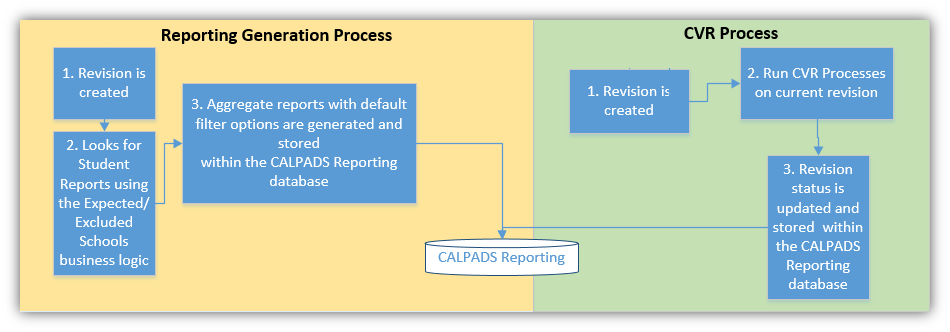
Report Generator steps:
- The Report Generator begins when a new revision is created from the Data Extractor process.
- It looks for specific types of data for a submission at the School and LEA levels. Expected Schools and Excluded Schools business logic are also applied during this process.
- New aggregate reports are generated for each unique revision stored within the CALPADS Reporting database.
CVR Processor steps (runs concurrently with Report Generation):
- CVR Processor also begins with a new revision created from the Data Extractor.
- CVR validation procedures identified for the particular submission are applied to the data in the current revision. CVR validations (Fatals & Warnings) are logged and stored within the CALPADS Reporting database.
- Once CVR Processing is completed, the new revision is given an initial Revision Status of "Revised Uncertified" and stored within the CALPADS Reporting database with a specific date/time stamp. The Revision is now available for review and certification.
LEA–SELPA Relationships
Due to the possible many-to-many relationships between LEAs and SELPAs:
- One LEA may need more than one SELPA to approve a revision in order to be considered CERTIFIED.
- One SELPA may need to approve more than one LEA.
- A SELPA may only approve an LEA's revision that has first been approved by the LEA.
- Certification Reports are only aggregated at the LEA level, not the school level.
- ESI Relationships between the SELPA and the LEA drive the list of associated SELPAs or LEAs and the SELPA/LEA dropdown filter on a Report.
- The actual SELPA Code submitted at the student-level record is used to filter data for the logged-in SELPA user.
Revision Status vs Submission Status vs SELPA Approval Status
| Term | Definition |
|---|---|
| Submission Status | Overall status of CERTIFIED or NOT CERTIFIED based on ONE of the associated Revisions. |
| Revision Status | Workflow status of the LEA's revision, including the sum of all SELPAs. |
| SELPA Approval Status | Workflow status of the individual SELPA per Submission > LEA > Revision. |
A Submission (e.g., Fall 1) can have multiple associated Revisions.
LEA Certification Process
https://www.youtube.com/embed/73bHXA7fgoU?start=6
Once the Data Extractor creates a Revision and both the Report Generator and CVR Processor have completed, the LEA can view the new Revision in the Certification Details UI. Once the LEA has resolved all fatal errors and reviewed all required aggregate reports, the LEA may approve the revision. For specific submissions, LEAs may require a SELPA approval to finalize the certification.
There are two varying certification processes depending on the submission.
This is a brief illustration of the certification process that LEAs and SELPAs will follow for Fall 1 and EOY 1 submissions.
%%{init: {
  "theme": "base",
  "themeVariables": {
    "fontSize": "12px",
    "nodeSpacing": 30,
    "rankSpacing": 45
  },
  "flowchart": {
    "curve": "linear",
    "htmlLabels": true
  }
}}%%
flowchart TD
    Start((Start))
    A["Data Collection<br>Certifier logs into<br>CALPADS"]
    B["Review<br>Certification<br>Reports"]
    M["LEA & SpEd Staff<br>collaboration to determine<br>accuracy of reports"]
    C["All Submission Certification<br>Reports Reviewed"]
    D{"Reports<br>correct?"}
    E["LEA Approval:<br>'Data Collection Approver'<br>clicks Approve"]
    F["CALPADS posts notification<br>to SELPA of LEA-level approval"]
    G{"SELPA<br>Approves or<br>Rejects?"}
    H["SELPA Approval<br>SELPA clicks Certification Button"]
    I(["Submission Certified"])
    J["Mark Submission<br>As Rejected"]
    K["CALPADS posts notification<br>to SELPA and LEA<br>of Rejection"]
    L["Submission<br>Process"]
    Start --> A --> B --> C --> D
    B -.-> M
    D -- No --> L
    D -- Yes --> E --> F --> G
    G -- Approves --> H --> I
    G -- Rejects --> J --> K --> L
    classDef decision fill:#dfe8f5,stroke:#5b7bb2,color:#000;
    classDef process fill:#ffffff,stroke:#d97b2b,color:#000;
    classDef notify fill:#e7f1dd,stroke:#6a9f3a,color:#000;
    classDef terminal fill:#d9ead3,stroke:#6a9f3a,color:#000;
    classDef submission fill:#a4b7d9,stroke:#5b7bb2,color:#000;
    class D,G decision;
    class A,B,C,E,H,J,M process;
    class F,K notify;
    class Start,I terminal;
    class L submission;
Fall 2 and EOY 2 submissions do not involve SELPA approval. SELPA users will not see these submissions in their filter options.
%%{init: {
  "theme": "base",
  "themeVariables": {
    "fontSize": "12px",
    "nodeSpacing": 35,
    "rankSpacing": 45
  },
  "flowchart": {
    "curve": "linear",
    "htmlLabels": true
  }
}}%%

flowchart TD

    A((Start))

    B["Data Collection<br>Certifier role<br>logs into CALPADS"]

    C{"Certification<br>Errors?"}

    D["Review<br>Certification<br>Reports"]

    E["All Submission Certification Reports<br>Reviewed"]

    F{"Reports<br>correct?"}

    G["LEA Approval:<br>'Data Collection Approver'<br>clicks Approve button"]

    H(["Submission<br>Certified"])

    I["Submission<br>Process"]

    A --> B
    B --> C

    C -- No --> D
    C -- Yes --> I

    D --> E
    E --> F

    F -- Yes --> G
    G --> H

    F -- No --> I

    %% Return path
    I -.-> A

    %% Styling
    classDef decision fill:#e6e6e6,stroke:#666,color:#000;
    classDef process fill:#f6c992,stroke:#666,color:#000;
    classDef submission fill:#cfe2f3,stroke:#666,color:#000;
    classDef certified fill:#c4df87,stroke:#666,color:#000;

    class C,F decision;
    class B,D,E,G process;
    class I submission;
class H certified;
Certification Status, Revision Status, and SELPA Approval Status
The following table demonstrates the actions that may change the status of a Revision, whether that change affects the submission's overall Certification Status, and when an email is expected to be sent.
| Actions | Revision Status changes to | Certification Status changes to | Send Email? |
|---|---|---|---|
| Revision is first created | Revised Uncertified | Uncertified | |
| LEA Manually checks In Review checkbox | In Review Uncertified | Uncertified | |
| LEA Reviews all required Certification Reports* | Revised Uncertified or In Review Uncertified | Uncertified | |
| LEA Approves Revision | LEA Approved | Uncertified | Send email |
| LEA Disapproves Revision | LEA Disapproved | Uncertified | Send email |
| Any one SELPA Approves Revision, but not all yet | LEA Approved | Uncertified | Send email |
| All associated SELPAs Approve Revision*** | SELPA Approved*** | Certified*** | Send email |
| Any one SELPA Disapproves Revision | SELPA Disapproved | Uncertified | Send email |
!!! warning "Multiple SELPAs" If there are MULTIPLE ASSOCIATED SELPAs, ALL must approve the revision before the Revision Status and Submission Status change. It only takes ONE SELPA or the LEA to Disapprove a Revision to affect the Submission Status.
**Example:** If LAUSD has 5 SELPAs, every SELPA must approve LAUSD's "LEA Approved" revision before the Revision Status is set to SELPA Approved.
This is a brief illustration of the certification process for LEAs. Fall 2 and EOY 2 submissions do not involve SELPA approval.
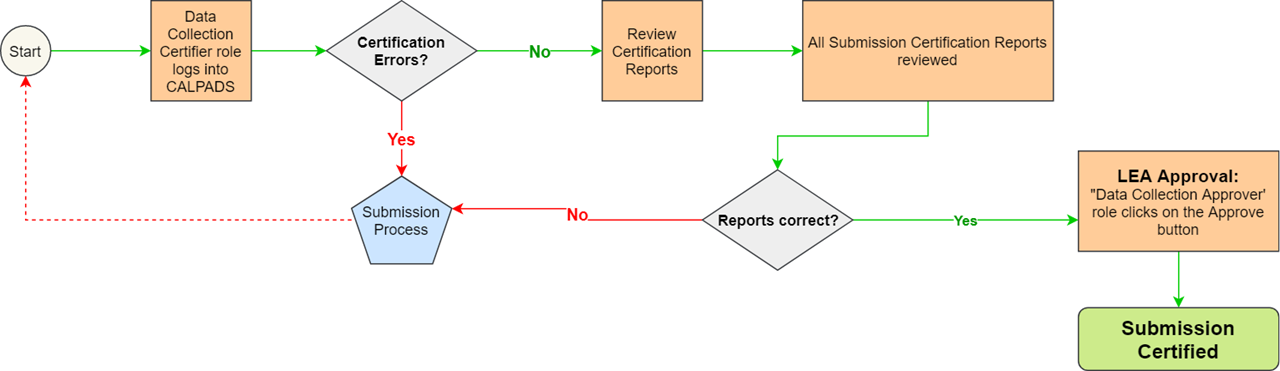
Certification Status and Revision Status
| Actions | Revision Status changes to | Certification Status changes to | Send Email? |
|---|---|---|---|
| Revision is first created | Revised Uncertified | Uncertified | |
| LEA Manually checks In Review checkbox | In Review Uncertified | Uncertified | |
| LEA Reviews all required Certification Reports** | Revised Uncertified or In Review Uncertified | Uncertified | |
| LEA Approves Revision | LEA Approved | Certified | Send email |
| LEA Disapproves Revision | LEA Disapproved | Uncertified | Send email |
Note
A Revision starts off with LEA Revision Status as Revised Uncertified and remains that way until the LEA either manually marks the In Review checkbox OR approves the revision.
Submission Availability by Academic Year
For academic years prior to 2025–2026, EOY submissions 1 through 4 (the legacy structure) remain available for historical purposes. Beginning with AY 2025–2026, EOY 1 and EOY 2 replace the previous four EOY submissions.
How to Decertify
Below is the recommended workflow for users needing to decertify in order to update their certified reports.
%%{init: {
  "theme": "base",
  "themeVariables": {
    "fontSize": "13px",
    "nodeSpacing": 40,
    "rankSpacing": 60
  },
  "flowchart": {
    "curve": "linear",
    "htmlLabels": true
  }
}}%%

flowchart LR

    A{"LEA or SELPA<br>need to<br>Decertify"}

    B["Click Disapprove"]

    C["CALPADS posts notification<br>to SELPA and LEA<br>of decertification"]

    D["Submission<br>Process"]

    A --> B --> C --> D

    %% Styling
    classDef decision fill:#dfe8f5,stroke:#5b7bb2,color:#000;
    classDef process fill:#ffffff,stroke:#d97b2b,color:#000;
    classDef notify fill:#e7f1dd,stroke:#6a9f3a,color:#000;
    classDef submission fill:#a4b7d9,stroke:#5b7bb2,color:#000;

    class A decision;
    class B process;
    class C notify;
    class D submission;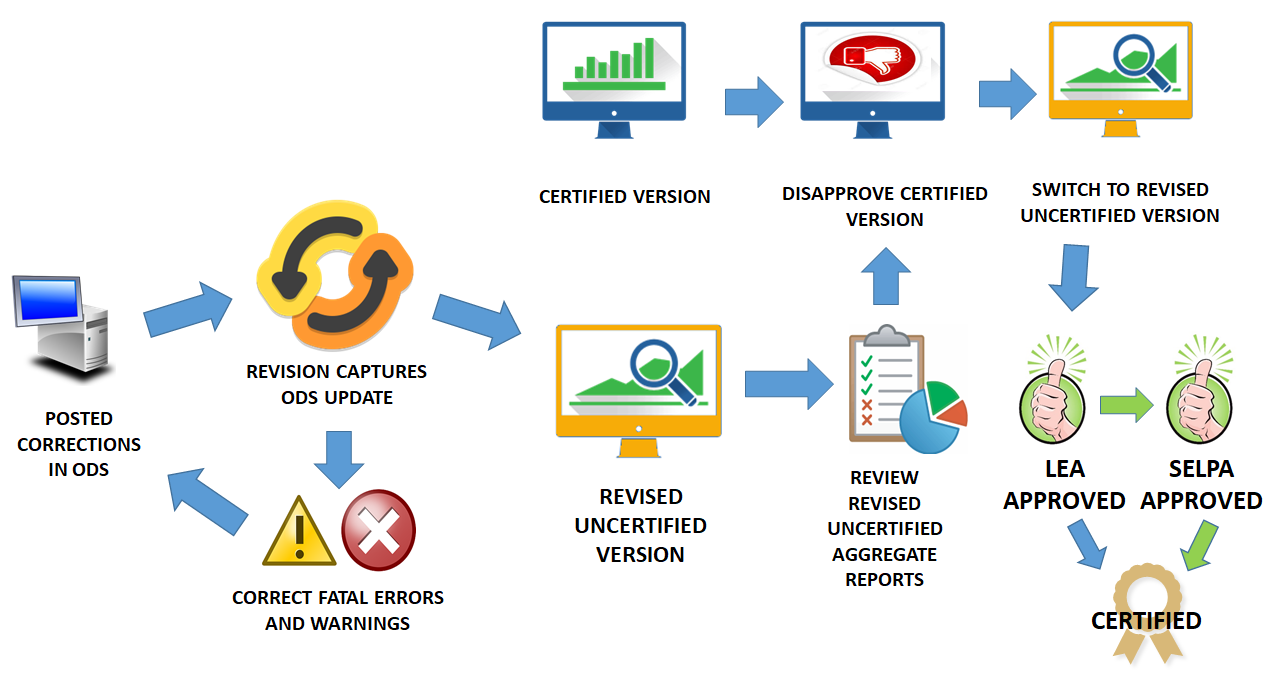
Step 1. When LEAs need to amend their certified reports, it is highly recommended that they do not click the Disapprove button before making corrections in the ODS. LEAs should take advantage of new revisions.
Step 2. Once the LEA approves a revision, all reports and statuses associated with that revision will be frozen. However, newer revisions will continue to be available to the LEA in parallel to the frozen LEA Approved version whenever changes in the ODS are made.
Step 3. The LEA should first make the corrections in the ODS and wait for a new Revised Uncertified version. By default, the system will show the Certified version. Switch the Revision Status dropdown to Revised Uncertified to reveal that version.
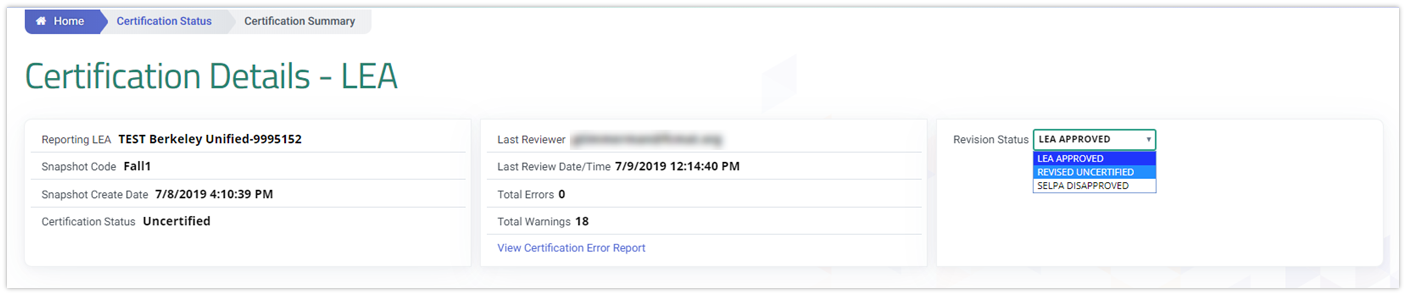
Step 4. If there are no fatal errors (or if the fatal errors are corrected and a new revision is generated), the LEA proceeds to review the aggregate reports.
Step 5. If the aggregate reports from the Revised Uncertified version are all reviewed and considered accurate, the LEA must switch the Revision Status back to the LEA Approved version and click the Disapprove button.
Step 6. Once the Disapprove button is clicked, switch the Revision Status to Revised Uncertified — the LEA Approval button should now be clickable.
Step 7. Once the LEA Approve button is clicked, Revision Status is updated to LEA Approved. For Fall 1 and EOY 1 submissions, LEAs are required to seek SELPA Approval before the certification is finalized.
How to Set In Review Status
LEAs have the ability to freeze a snapshot version of the data without certifying. This is useful when:
- Users are waiting for other departments to review and sign off on the reports relevant to their department (e.g., CTE, Special Ed, Discipline).
- Users have accurate reports but are not ready to certify yet and want to avoid problems caused by future CALPADS defects.
By clicking the In Review checkbox, LEAs can preserve this snapshot version.
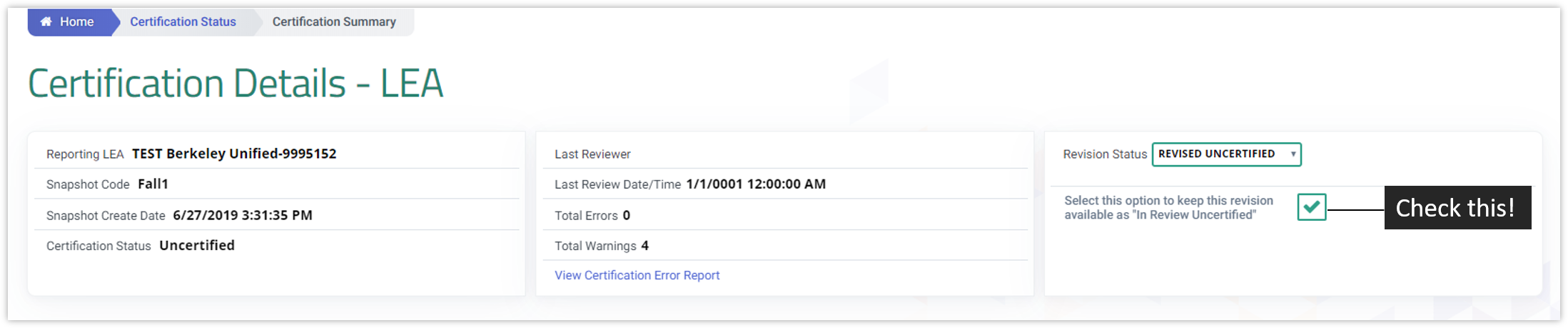
Tip
Only one revision can be set to "In Review Uncertified" at a time. If you select a different revision to mark as In Review, the system will prompt you to confirm that the previous In Review revision will no longer be preserved.
Additional Resources
CALPADS Snapshot and Revision Video
This video clip covers the details of the CALPADS Snapshot Revision statuses and functionality through a live demo.
CALPADS Certification Process Playlist Video
This playlist provides an in-depth discussion and demonstration of the CALPADS Submission Certification process.
Certification Process
Revision Process Overview
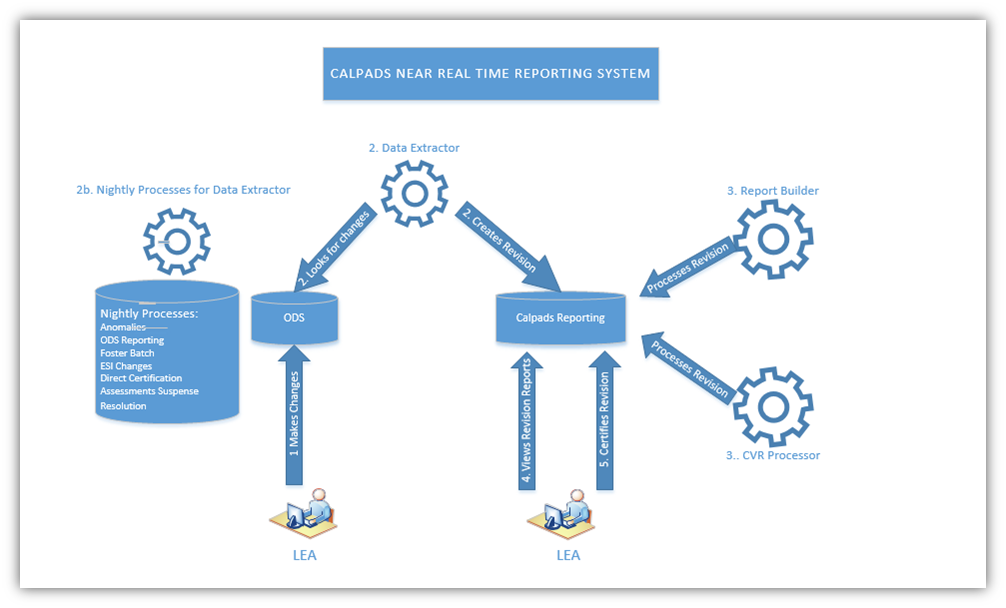
The above diagram represents the main components in the Revision process and the surrounding steps that result in Certification.
-
LEAs continually submit data to CALPADS ODS.
-
The Data Extractor component extracts and flags data from the CALPADS ODS into the CALPADS Reporting Database at a prescribed, configurable interval running throughout the day. (See section below for further details on frequency and flagging of data.) The Data Extractor also runs nightly for processes that require substantial processing resources.
-
Reports are generated and provided to the LEAs for review (see the Certification User Interface Specification on details of how LEAs review reports). Warnings and fatal certification errors are identified. Fatal errors must be resolved to prevent an LEA from certifying their revision (see section below on Certification Validation Rules and Excluded Schools for additional information on the validation rules process).
-
LEAs must review aggregate reports and supporting data to determine data accuracy.
a. LEAs may update the ODS data if needed and repeat steps 1- 4. The revised data will be incorporated into a newer version of the extracted data, known as a Revision.
-
LEAs are expected to certify the data is accurate and, if necessary, decertify data that has already been certified to allow for updates, as long as the Data Collection Window remains open for that specific submission. (See Reporting Calendar, Collection Window, and Amendment Window sections below for details on time frames for certification and decertification.)
CALPADS Data Extractor
The CALPADS Data Extractor (or the Data Extractor, for short) is a component that extracts and flags data from the CALPADS ODS into the CALPADS Reporting Database.
-
The Data Extractor is triggered for an LEA throughout the day by changes to the ODS when all files for that LEA have posted and 15 minutes have passed with no additional file upload or post activity by the moment Data Extractor triggers.
-
The Data Extractor is also triggered by nightly processes that require substantial processing resources. These nightly processes (Anomalies, Online or Batch files posted, ODS Reporting, Foster, ESI Changes, Direct Certification, Assessment Suspense Resolution) represent changes to the ODS, which also trigger the Data Extractor to create new Revisions for affected LEAs.
During the extraction process, the Data Extractor incorporates business rule calculations/classifications to flag records in the CALPADS Reporting Database.
The new version of the data extracted for an LEA is referred to as a Revision. There are differences between a Snapshot and a Revision. A snapshot identifies the data stored within CALPADS for a specific submission certification cycle and a revision is a version of that data within the snapshot that has a specific data and timestamp within that certification cycle.
Revision Characteristics
-
Revisions capture information for an open collection window (submission Fall1, Fall 2, etc.). Revisions are no longer generated when the amendment window ends for a submission
-
Revisions are a representation of data for a specific date and time available for an LEA within an Academic Year.
-
Revisions are generated continuously based upon changes within the ODS database within the defined Snapshot Collection window.
-
Certification reports are created based upon information available within a revision.
-
The data within the revisions meet specific criteria (LEA, Academic Year, etc).
Report Generation and CVR Process
Once the Data Extractor has created a new Revision, two components run concurrently: the Report Generator and the CVR Processor. These two components run in the background and listen for a new Revision every 10 minutes. These processes must both complete against a Revisions before it’s made available for review by an LEA.
The steps below describe the Snapshot Report Generator:
-
The Report Generator process begins when a new revision is created from the Data Extractor process.
-
The Report Generator process looks for specific types of data for a submission for the School and LEA levels standard reports. Expected Schools and Excluded schools business logic are also applied during this process.(see Certification Validation Rules (CVRs), Excluded and Expected Schools)
-
New aggregate reports are generated for each unique revision stored within the CALPADS Reporting database, so that it can be retrieved based upon the revision.
The CVR Processor runs concurrently with the Report Generation Process. The steps below describe the CVR process:
-
CVR Processor process also begins with a new revision that has been created from the Data Extractor process.
-
CVR validation procedures are identified for the particular submission are applied to the data in the current revision. CVR validations (Fatals & Warnings) for the revision are logged and stored within the CALPADS Reporting database until Expected Schools and Excluded schools business logic are applied during this process (see section below for business rules relating Certification Validation Rules (CVRs), Excluded and Expected Schools).
-
Once CVR Processing is completed, the new revision is given an initial Revision Status of “Revised Uncertified” and stored within the CALPADS Reporting database and made available to the UI with a specific date/time stamp. The Revision is now available for review and certification process
Due to the possible Many to Many relationships between LEAs and SELPAs: One LEA may need >1 SELPA to Approve a revision in order to be considered CERTIFIED. One SELPA may need to approve more than one LEA A SELPA may only Approve an LEA’s revision that has FIRST been approved by the LEA; they may NOT work on approving separate Revisions. Certification Reports are only aggregated at the LEA level, NOT school level. ESI Relationships between the SELPA and the LEA will drive the list of associated SELPAs or associated LEAs. It will also drive the SELPA or LEA dropdown filter on a Report. The actual SELPA Code that is submitted at the student level record will be used to filter out data based on the logged in SELPA user.
Revision Status vs Submission Status vs SELPA Approval Status
A Submission (e.g. Fall 1) can have multiple associated Revisions.
Submission Status is overall status of CERTIFIED or NOT CERTIFIED based on ONE of the associated Revisions.
Revision Status is the workflow status of that LEA’s revision, including the SUM OF ALL SELPAs.
SELPA Approval Status is the workflow status of the individual SELPA per SUBMISSION>LEA>REVISION
Due to the possible Many to Many relationships between LEAs and SELPAs:
- One LEA may need >1 SELPA to Approve a revision in order to be considered CERTIFIED.
- One SELPA may need to approve more than one LEA
- A SELPA may only Approve an LEA’s revision that has FIRST been approved by the LEA; they may NOT work on approving separate Revisions. Certification Reports are only aggregated at the LEA level, NOT school level.
- ESI Relationships between the SELPA and the LEA will drive the list of associated SELPAs or associated LEAs. It will also drive the SELPA or LEA dropdown filter on a Report.
- The actual SELPA Code that is submitted at the student level record will be used to filter out data based on the logged in SELPA user.
LEA Certification Process
Once the Data Extractor creates a Revision and both the Report Generator and CVR processor have been run against that revision, the LEA can view the new Revision in the Certification Details UI. Once the LEA has resolved all fatal errors and reviewed all required aggregate reports, the LEA may approve the revision. For specific submissions, LEAS may require a SELPA approval to finalize the certification.
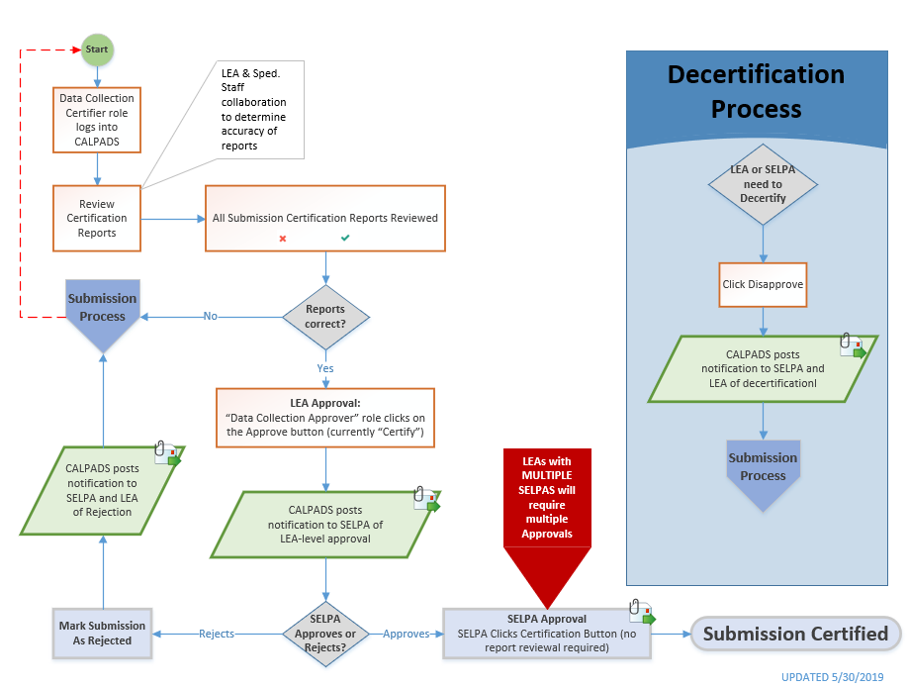
There are two varying certification process that LEAs will encounter depending on the submission.
Fall 1, EOY 3 and EOY 4
This is a brief illustration of the certification process that LEAs and SELPAS will doing for the indicated submissions.
Certification Status, Revision Status, and SELPA Approval Status
The following tables demonstrate the actions that may change the status of a Revision, whether that change affects the submission’s overall Certification Status, and when an email is expected to be sent.
Fall 1, EOY3, EOY4 – SELPA Approvals Required for Certification
|
Actions |
Revision Status changes to |
Certification Status changes to |
Send Email? |
|
Revision is first created |
Revised Uncertified |
Uncertified |
|
|
LEA Manually checks In Review checkbox |
In Review Uncertified |
Uncertified |
|
|
LEA Reviews all required Certification Reports* |
Revised Uncertified or In Review Uncertified |
Uncertified |
|
|
LEA Approves Revision |
LEA Approved |
Uncertified |
Send email |
|
LEA Disapproves Revision |
LEA Disapproved |
Uncertified |
Send email |
|
Any one SELPA Approves Revision, but not all yet |
LEA Approved |
Uncertified |
Send email |
|
All associated SELPAs Approve Revision* |
SELPA Approved* |
Certified* |
Send email |
|
Any one SELPA Disapproves Revision |
SELPA Disapproved |
Uncertified |
Send email |
*NOTE: If there are MULTIPLE ASSOCIATED SELPAs, ALL must approve the revision before the Revision Status and Submission Status changes. It only takes ONE SELPA or the LEA to Disapprove a Revision, that will affect the Submission Status.
Fall 2, EOY 1, and EOY 2
This is a brief illustration of the certification process for LEAs. Fall 2, EOY 2 and 3 submissions do not involve SELPA approval.
Certification Status and Revision Status
The following tables demonstrate the actions that may change the status of a Revision, whether that change affects the submission’s overall Certification Status, and when an email is expected to be sent.
Fall 2, EOY1, EOY2 – SELPA Approvals NOT Required for Certification
|
Actions |
Revision Status changes to |
Certification Status changes to |
Send Email? |
|
Revision is first created |
Revised Uncertified |
Uncertified |
|
|
LEA Manually checks In Review checkbox |
In Review Uncertified |
Uncertified |
|
|
LEA Reviews all required Certification Reports** |
Revised Uncertified or In Review Uncertified |
Uncertified |
|
|
LEA Approves Revision |
LEA Approved |
Certified |
Send email |
|
LEA Disapproves Revision |
LEA Disapproved |
Uncertified |
Send email |
*Note: A Revision starts off with LEA Revision Status as New Revision and remains that way until the LEA either manually marks the In Review checkbox OR they Approve a revision.
How to Decertify
Below is a depiction of the recommended workflow for users needing to decertify to update their certified reports.
Step 1. When LEAs need to amend their certified reports, it is highly recommended that they don't click on the disapprove button before making corrections in the ODS. LEAs should take advantage of new revisions.
Step 2. Once the LEA approves a revision, all reports and statuses associate dto that revisions will be frozen. However, newer revisions will continue to be available to the LEA in parallel to the frozen LEA Approved versions, whenever changes in the ODS are made.
Step 3. LEA should first make the corrections in the ODS and wait for a new Revised Uncertified version. By default, the system will show the Certified version. Switch the Revision Status dropdown menu to Revised Uncertified or reveal that version.
Step 4. If there are no fatal errors or if the fatal errors are corrected and a new revision is generated, the LEA wil proceed to review the aggregate reports.
Step 5. If the aggregate reports from the Revised Uncertified version are all reviewed and considered accurate, the LEAs has to switch the Revisions status back to the LEA Approved version and click on the Disapprove button.
Step 6. Once the Disapprove button is clicked, user must switch Revision status to Revised Uncertified where the LEA Approval button should now be clickable.
Step 7. Once the LEA Approve button is clicked, Revision Status is updated to LEA Approved. Depending on the submission period (e.g. Fall 1, EOY 3, EOY4), LEAs may be required to seek a SELPA Approval before the certification is finalized. .
How to set In Review Status
LEAs have the ability to freeze a snapshot version of the data without certifying. This is useful when
- Users are waiting for other departments to review and sign off on the reports relevant to their department (e.g. CTE, Special Ed, Discipline)
- Users have accurate reports but are not ready to certify yet and avoid and problems caused by future CALPADS defects.
By clicking on the In Review button, LEAs can preserve this snapshot version.
Additional Resources
CALPADS Snapshot and Revision Video
This video clip covers the details of the CALPADS Snapshot Revision statuses and functionality through a live demo.
CALPADS Snapshot and Revision Video
This playlist provides an in-depth discussion and demonstration of the CALPADS Submission Certification process.