Course Data Details (CRSE and CRSC)
(Updated 9/8/2026)
The Course Details page enables an authorized user to update all components of the Course Section record. The page displays when a user selects either the
(1) Edit Course Sections on the Course Data page. OR
(2) Click on Add New Course Section button on the “Course Data page. OR
(3) Click on the Open button of a staff course record from the Staff Detail page.
When the Edit Course Section or Add Section buttons are selected, the fields on the Course Information section will contain the values from the selected course section record. Only the Course Section InformationThe fields will be Blank, when the Add new Course Section button is selected.
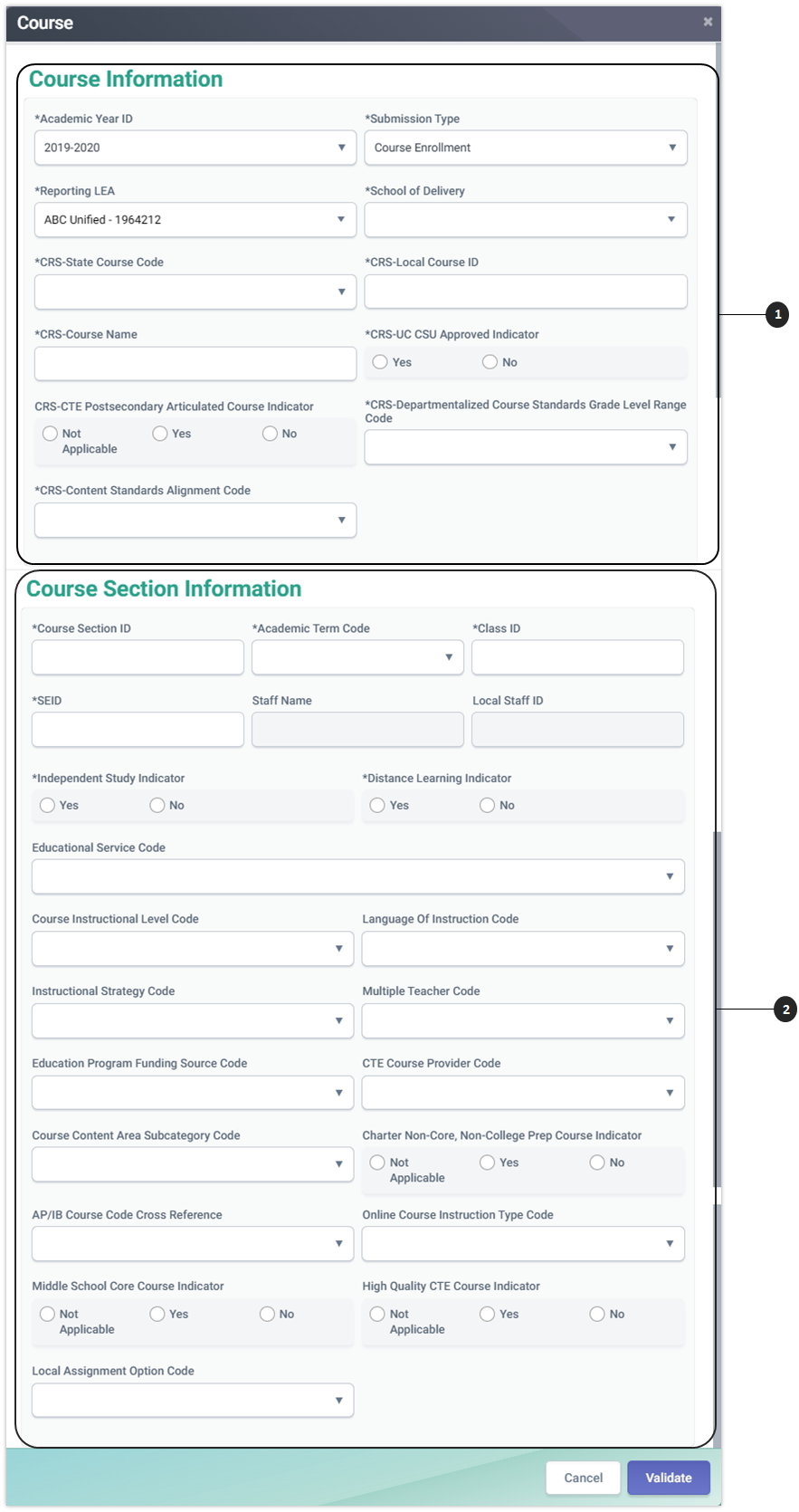
The Course Information page is divided into two sections to manage the relationships between a course (CRS) and its associated course section data.
 Course Information
The top portion of the screen is used to manage course data.
 Course Section Information
The bottom half of the screen , the Course Section Information is used to maintain course section information associated with the course data.
The user may navigate through the existing course sections associated with the selected course data. At least one course section must be added when creating a new course. The combination of the course (CRS) and course section components results in a complete CALPADS Course Section record.
These two sections of the Course Details page allow the user to keep the course (CRS) components of the CALPADS Course Section record the same while editing the course section components as well as to create an entirely new Course Section record consisting of both the course (CRS) and course section components.
Course Section Details Modal
The “Course Section Detail” modal allows an authorized user to update a selected Course section record that belongs to the user’s LEA after viewing the existing information. The user may also delete the record once the course section information has been viewed. This page displays when the user selects the Open or Add New Record buttons from the Course Data container as well as the Staff Course container from the Staff Details
The “Course Section Details” UI depiction followed by its screen elements table.
Course Section Details

Course Information Details Table
Course Information: Editing Course-level data elements will affect all related Course Sections.
| # | Field Name | Code Set | Required | Validation/Business Rule |
|---|---|---|---|---|
| 1 | Academic Year ID | N/A | Y | N/A |
| 2 | Submission Type | Enrollment or Completion | Y | N/A |
| 3 | Reporting LEA | Education Service Identifier | Y | N/A |
| 4 | School of Course Delivery | Education Service Identifier | Y | N/A |
| 5 | CRS - State Course Code | Course Group State | Required if Local Course ID is not mapped to a State Course Code in CALPADS | Field must meet the specified CALPADS data validation and business rule requirements. The State Course Code is concatenated with the State Course Name to create the dropdown and is sorted in ascending sequence by State Course Code. |
| 6 | CRS - Local Course ID | N/A | Y | Field must meet the specified CALPADS data validation and business rule requirements. |
| 7 | *CRS - Course Name | N/A | Y | All records with the same Academic Year, School of Delivery, and CRS - Local Course ID must have identical CRS - Course Names. |
| 8 | CRS - UC CSU Approved Indicator | Yes; No | Y | 1. If the State Course Code is considered by CDE as likely to meet UC and CSU requirements, per the Master Course Combos in CALPADS Valid Code Combinations, this field should equal "Y". 2. All records with the same Academic Year, School of Delivery, and CRS - Local Course ID must have identical CRS - UC CSU Approved Indicators. |
| 9 | CRS - CTE Postsecondary Articulated Course Indicator | Not Applicable; Yes; No | N | "Y" indicates that this is a Postsecondary Articulated Course; "N" or blank indicates that it is not. |
| 10 | CRS – Departmentalized Course Standards Grade Level Range Code | Departmentalized Course Standards Grade Level Range | Y | Must be a valid combination in the CrsGrpSt – StndsGrdLvlRange combinations in the CALPADS Valid Code Combinations. |
| 11 | CRS – Content Standards Alignment Code | Content Standards Alignment | Y | 1. If CRS – Departmentalized Course Standards Grade Level Range Code = NOT – Not Applicable, then CRS – Content Standards Alignment Code must equal 3 - Not Content Standards-Aligned or Not Applicable. 2. If CRS – Departmentalized Course Standards Grade Level Range Code is not equal to NOT – Not Applicable, then CRS – Content Standards Alignment Code cannot equal 3 - Not Content Standards-Aligned or Not Applicable. |
Course Section Information Details

Course Section Information Details Table
| # | Field Name | Code Set | Required | Validation/Business Rule |
|---|---|---|---|---|
| 12 | Course Section ID | N/A | Y | Field must meet the specified CALPADS data validations and rules requirements. |
| 13 | Academic Term Code | Academic Term | Y | N/A |
| 14 | Class ID | N/A | Required if Record Type Code = CRSE | Field must meet the specified CALPADS data validations and rules requirements. |
| 15 | SEID | N/A | Y | 1. SEID must be a valid SEID in the CCTC file or equal 9999999999. 2. A Staff Demographic record should exist for the same SEID in the Course Section Record during upload/input, except when the SEID equals 9999999999. SEID 9999999999 should only be submitted under the following conditions: • Charter school teacher teaching non-core classes as defined by the charter • Course Section taught by a teacher who is not an employee of the LEA (e.g., ROC/P teacher, college professor, COE Special Education teacher, distance learning teacher, or private contractor) • SEID has not yet been provided by CCTC |
| 16 | Staff Name | N/A | N | If a Staff Demographic Record exists, the Staff Name will be populated. |
| 17 | Local Staff ID | N/A | N | If a Staff Demographic Record exists, the Local Staff ID will be populated. If not, the user must input the Local Staff ID. If multiple teachers are associated with the section, both Local Staff IDs will display. |
| 18 | Independent Study Indicator | Yes; No | Y | Field must meet the specified CALPADS data validations and rules requirements. |
| 19 | Distance Learning Indicator | Yes; No | Y | Field must meet the specified CALPADS data validations and rules requirements. |
| 20 | Education Service Code | Education Service English Learners | N | N/A |
| 21 | Course Instructional Level Code | Course Non-Standard Instructional Level | N | N/A |
| 22 | Language of Instruction Code | Language | Required if Education Service Code = 1 | Field must meet the specified CALPADS data validations and rules requirements. |
| 23 | Instructional Strategy Code | Instructional Strategy | N | REMINDER: Instructional Strategy Code 700 should ONLY be used for courses specifically designed for students with disabilities where all students enrolled are students with disabilities. |
| 24 | Multiple Teacher Code | Multiple Teacher Instruction Strategy Category | N | If Record Type Code = CRSE and Multiple Teacher Code is populated, then two or more Course Section records with the same Class ID must be submitted with different SEIDs. Exception: SEID = 9999999999. |
| 25 | Education Program Funding Source Code | Education Program Funding Source | N | N/A |
| 26 | CTE Course Section Provider Code | Career Technical Education Funding Provider Category | Field no longer used | N/A |
| 27 | Course Content Area Subcategory Code | Course Content Area Subcategory | Required if State Course Code = 9000, 9051, 9080, 9090, 9130–9137, 9155, 9222, 9223, 9291, 9292, 9293, 9294, 9316, 9381, or 9400 | 1. If populated, must be a valid combination per the CrsGrpSt - ContentSubctgy combinations in the CALPADS Valid Code Combinations. 2. If State Course Code is not 9000, 9002, 9051, 9080, 9090, 9130–9137, 9155, 9222, 9223, 9291, 9292, 9293, 9294, 9316, 9381, or 9400, this field must be blank. |
| 28 | AP/IB Course Code Cross Reference | AP/IB Course Code Cross Reference | N | If populated, CRS - State Course Code must equal a CTE State Course Code in the range 7000–8999. If populated, it must equal an active course identified as an AP or IB course in the AP or IB columns in the Course Group Master Combos in the CALPADS Valid Code Combinations. |
| 29 | Online Course Instruction Type Code | Online Course Instruction Type | Required if Distance Learning Indicator = Y | If Distance Learning Indicator = N or is blank, this field must be blank. |
| 30 | Middle School Core Course Indicator | Not Applicable; Yes; No | If Departmentalized Course Standards Grade Level Range = MID (Middle Grades 5–8), Middle School Core Course Indicator must = Y or N | N/A |
| 31 | High Quality CTE Course Indicator | Not Applicable; Yes; No | If the CRS - State Course Code associated with the Course Section is in the range 7000–8999, High Quality CTE Course Indicator must = Y or N | If the CRS - State Course Code associated with the Course Section is not in the range 7000–8999, High Quality CTE Course Indicator must be blank. |
| 32 | Local Assignment Option Code | Local Assignment Option | N | N/A |
| 33 | Itinerant Teaching Assignment Indicator | Y/N | N | The course (assignment) is taught by a staff member (employee) who holds a position at a school or district with an instructional teaching assignment that requires certification or other state alternative and whose duties require providing direct instruction to the pupils in multiple schools and is not assigned to a single classroom or school building. Instead, itinerant teachers travel between multiple sites, such as different schools within a district or multiple districts, to provide specialized instruction. The itinerant teacher included in these data has a Statewide Educator Identifier (SEID) assigned by the California Commission on Teacher Credentialing (CTC) and their staff assignment and demographic data are reported through the CALPADS. |
| 34 | Pull-Out/Push-In Teaching Assignment Indicator | Y/N | N | The course (assignment) is taught by a staff member (employee) who holds a position at a school or district with a teaching assignment that requires certification or other state alternative and whose duties require instructing students by "pulling” students out of the classroom, and/or "pushing in" to the classroom to provide focused instruction. The pull-out/push-in teachers in these data have a Statewide Educator Identifier (SEID) assigned by the California Commission on Teacher Credentialing (CTC) and their staff assignment and demographic data are reported through CALPADS. |
| A | Cancel Button | N/A | N/A | Returns course section values to original state and returns user to Course Data page. |
| B | Post Button | N/A | N/A | Posts Course/Course Section records for the selected school. |
CRSE Data Population Training
Additional Resources
CALPADS File Specifications
Look for Course Section Tab
CALPADS Data Guide
Chapter 2.3 provides additional information on Course Data reporting.
CALPADS Valid Code Combinations
Please refer to the following tabs:
- CTE Pathway - CTE Industry Sect
- CTE Pathway - CTE Sub-pathways
- Course Group Master Combos
- Course Group State - Course Content Area Subcategory
- Course Group State - Students Grade Level Range -Non Classroom Based or Support Assignment - Content Area Category Assignment
CALPADS Code Sets
Please refer to the following codes:
- Course Group State
- Departmentalized Course Standards Grade Level Range
- Content Standards Alignment
- Online Course Instruction Type
- Course Content Area Subcategory