Welcome SELPA Users
Welcome to CALPADS. This primer will provide you the necessary tools in navigating through the CALPADS system and the different reporting requirements for which you are expected to comply.
Where Do I Start?
You will need to have access to CALPADS. Request for SELPA user accounts can be made by sending an email to calpads-support@cde.ca.gov. Once the ticket is received, the CDE will contact you shortly with the application and instructions. Each SELPA organization is allowed to have up to two SELPA accounts.
How Do I Connect to CALPADS?
Once you have received your CALPADS access, you may log in here: https://www.calpads.org. Upon logging in, please make sure that necessary SELPA roles have been assigned to your account.
SELPA Level Account Roles
SELPA accounts will be created by CDE and will be under the SELPA organization type. The following essential roles will enable you as a user to review data and reports and certify. However, you may add all the available SELPA roles to your account. Please refer to the User Roles table for a description of all the different available roles.
How Do I Stay Informed?
CALPADS Listserv
You will want to subscribe to the CALPADS list serve, which is the CDE's primary method of communicating CALPADS related information such as deadlines, functionality, training, among other topics.
Subscribe here: http://www.cde.ca.gov/ds/sp/cl/listservs.asp
How Do I Get Training?

CALPADS Learning
Bridge Account Request
The next important step is to sign up for a CALPADS Bridge account for training. Up to two SELPA users are allowed access to the site. CALPADS Learning contains required self-paced classes, course programs and access to register for live training classes.
Please go to the CSIS/FCMAT website and follow the instructions in the image below for the steps in requesting an account.
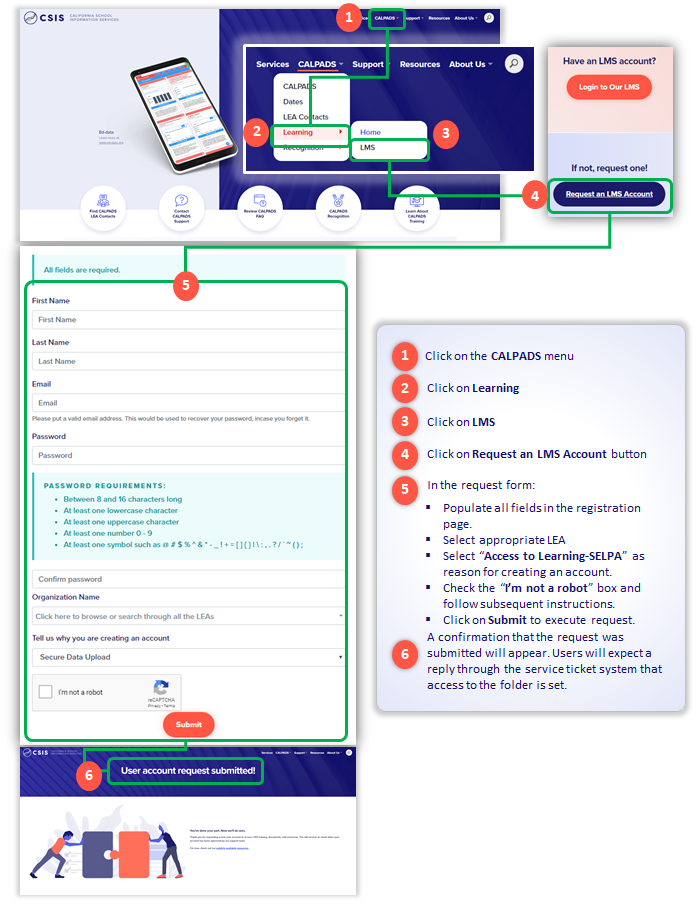
Bridge Training for SELPA
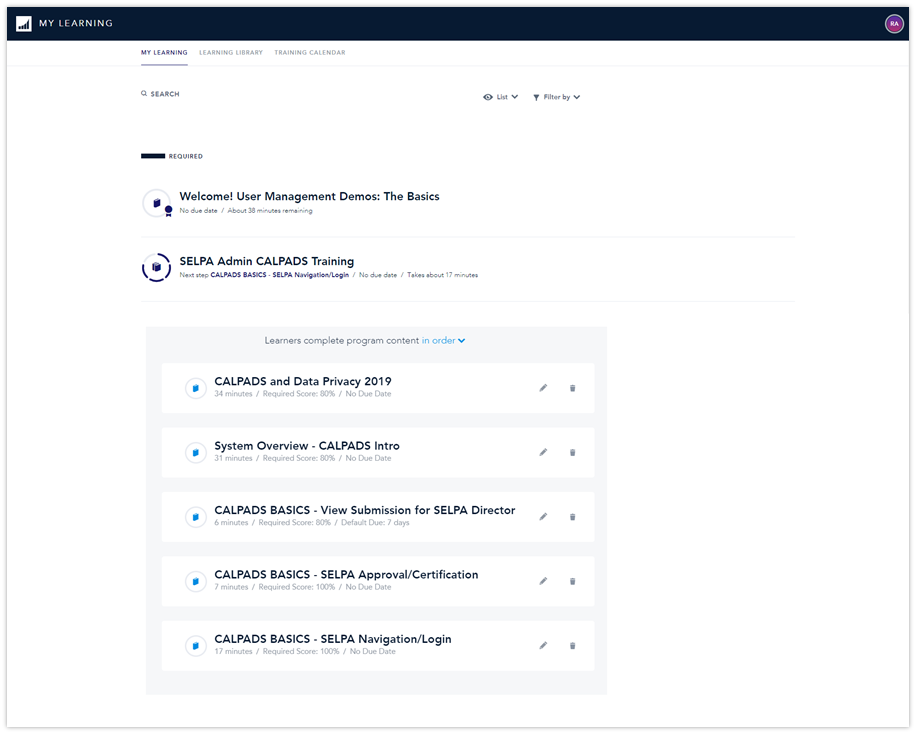
Once you are provided a bridge account, log in to Bridge. Please watch the required training courses. You may also take the all available self-paced sessions that can be paused, rewound, etc. You may also register for live training courses that may be offered for SELPA users in the future.

CSIS Youtube
FCMAT/CSIS provides self-paced videos via YouTube that allow any user to view training presentations at their own pace. You may click on the logo above to viist our channel. Please subscribe to get notifications for new training videos.
CALPADS Essential Resources
The following resources are essential to provide additional information regarding the operation and data submission requirements of CALPADS.
- – System Documentation - The page stores additional information regarding the operation and data submission requirements of CALPADS.
- – CALPADS CDE Home Page - The California Department of Education's CALPADS resource page.
- – Reporting Data for Students with Disabilities - This page provides common scenarios for determining which LEA is responsible for reporting SWD data, and which LEA will be held accountable on the Dashboard.
- – SELPA Level Report Mapping Guide - This page will help LEA - level users navigate through the nuances of each CALPADS LEA level reports.
- – Current Known Issues List - This document lists the most current defects in CALPADS.
- – CDE School Directory - The California School Directory (Directory) contains information about California public schools, private schools (including NPS and NPA), school districts, and county offices of education.
- – CSIS LEA Contact Lookup - The Lookup tool to search for another LEAs main CALPADS contact person.
Support Information
Remember, the CALPADS Service Desk is here to assist you any step of the way. Please contact us if you need help getting oriented with CALPADS.
- Web Form: Click Here
- Email: calpads-support@cde.ca.gov
- Voicemail for CALPADS Support: (916) 325-9210