Report 14.2 - Student Absences-Student List
Description: Reports a student list of positive attendance and student absenteeism by days of expected attendance, days attended and days absent. Absences are totaled by days excused, days unexcused, and days missed due to out-of-school suspensions.
Security Role Required: EOY Reports
Data As Of:
- Snapshot version, any time in the reported academic year (7/1 – 6/30)
Basic selection criteria:
o Any open or closed enrollment within the LEA at any time during the Report Period (7/1/2024 - 6/30/2025) qualifies for selection.
o Enrollment Status Code = Primary Enrollment (10), Short Term Enrollment (30)
o Default Grade Level = TK – 12
o Qualifying Data:
- Student Absent Summary Record (Record Type = STAS) for the Academic Year being reported
- Student Enrollment (SENR) reported or used for selecting student subgroups (e.g. Enrollment Status and Grade Level) are associated with the most recent qualifying enrollment at the school during the Report Period - Student Information (SINF) data reported or used for selecting student subgroups (e.g. Ethnicity/Race) are selected from the most recent SINF record with Effective Start Date and Effective End Date (if exists) that overlap the most recent qualifying enrollment at the school during the Report Period - Student Program (SPRG) data used for selecting student subgroups (e.g., Special Education Program) are selected from the most recent SPRG record for the same school of attendance as the STAS record with the Education Program membership Start Date and Education program Membership End Date (if exists) that overlap with the most recent qualifying enrollment at the school during the Report
- Student English Language Acquisition Status (SELA) data reported or used for selecting student subgroups (e.g. ELAS Status) are selected from SELA record for students with a qualifying enrollment. Student English Language Acquisition (SELA) reporting will need to find the most recent status on the report date (using Effective Start Date) that was effective during the reporting period, regardless of Reporting LEA (unless specified otherwise in the specific report data field).
Report Filters: Filters can be selected resulting in only totals for the selected filter being displayed
- Academic Year
- LEA
- Status
- School Type
- School
- Grade
- Gender
- Ethnicity/Race
- Enrollment Status
- English Language Acquisition Status
- Socio-economically Disadvantaged
- Students with Disabilities
- Homeless Program Eligible
- Title I Part C Migrant
- Foster Youth
- Hourly Attendance Indicator
- Period-by-Period Attendance Method Indicator
- Absenteeism Category
- Absence Type*
- Expected Attendance Days Indicator
- Days Attended Indicator
*Note: This filter will affect the formula for determining the absence rate for each student when being displayed on the report. When a specific absence type is selected, only those records with at least one day in the selected absence type will appear on the report with all of the record’s data populated. Example: When Out-of-School Suspension is selected, the formula rate = Out of School Suspension Days/Expected Attendance Days multiplied by 100.
Report Logic
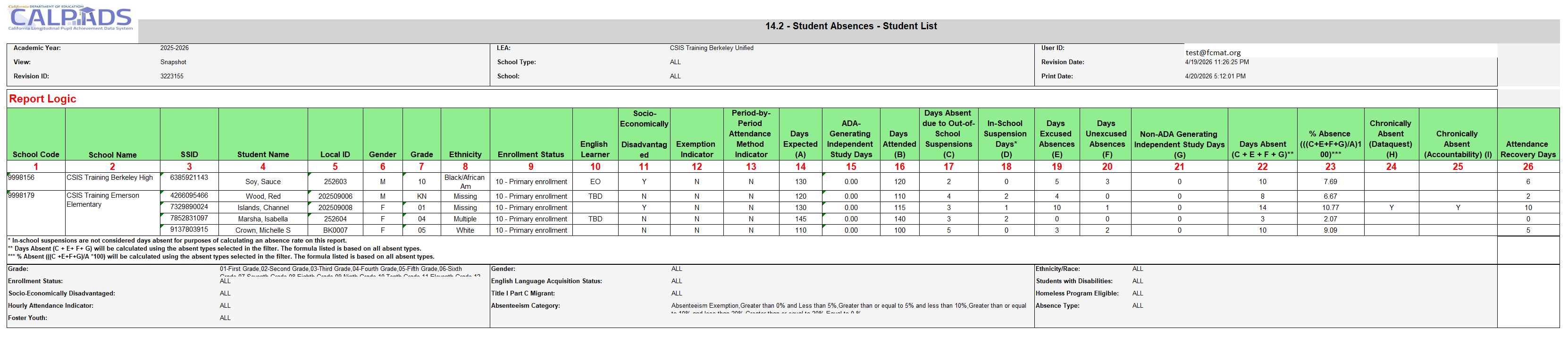
| # | Field | Description |
|---|---|---|
| 1 | School Code | Derived from user ID permission and Expected Schools table. |
| 2 | School Name | Determined by School Code and the Expected Schools Table. |
| 3 | SSID | SENR Field 1.08 – Unique identifier assigned to the student by the first California district of enrollment; follows the student throughout enrollment in California. |
| 4 | Student Name | SINF Fields 2.13 (Legal Last Name), 2.11 (Legal First Name), and 2.12 (Legal Middle Name). |
| 5 | Local Student ID | SENR Field 1.09 – Identifier assigned to the student by a local educational agency. |
| 6 | Gender | SINF Field 2.19 (Student Gender Code). |
| 7 | Grade | SENR Field 1.25 (Grade Level Code) = TK–12. |
| 8 | Ethnicity/Race | Identified using Fields 2.24–2.31 using the following rules: 1. If Student Hispanic Ethnicity Indicator (2.24) = Y, roll up to Hispanic. 2. If 2.24 = N or null, 2.25 = Y or null, and Race Codes (2.26–2.30) indicated, roll up per Rule 5. 3. If 2.24 = N and 2.31 = Y, roll up to Missing. 4. If 2.24 = N or null and 2.31 = Y, roll up to Missing. 5. If 2.24 = N or null, 2.31 = N or null, and Race Codes indicated, roll up as follows: • American Indian or Alaska Native (100) → American Indian or Alaska Native • Asian subgroup(s) only (201–299) → Asian • Filipino (400) only → Filipino • Filipino + Asian subgroup(s) only → Filipino • Native Hawaiian/Pacific Islander subgroup(s) only (301–399) → Hawaiian/Pacific Islander • Black or African American (600) → Black or African American • White (700) → White • More than one major race category → Multiple Note: Applies to Snapshot reports starting AY 2016–17 and ODS reports. In ODS reports generated in AY 2016–17, Filipino will not display separately or count within Asian. |
| 9 | Enrollment Status Code | SENR Field 1.23 – Enrollment Status Code. |
| 10 | ELAS Status Code | SELA Field 12.13 – Student ELAS Status Code. |
| 11 | Socio-Economically Disadvantaged Indicator | Yes/No indicator based on one or more of the following: • Parent/Guardian Highest Education Level = 14 (Not HS Graduate) • SPRG Field 3.13 = 181 or 182 • Migrant Eligible • SPRG Field 3.13 = 191 • Foster Program Eligible • Direct Certification = Y • Juvenile Court School Enrollment • SPRG Field 3.13 = 193 |
| 12 | Absence Data Collection Exemption Indicator | STAS Field 13.13 – Student Absence Summary Data Collection Exemption Indicator. |
| 13 | Period-by-Period Attendance Method Indicator | STAS Field 13.23. |
| 14 | Expected Attendance Days | STAS Field 13.15. |
| 15 | ADA-Generating Independent Study Days | STAS Field 13.22. |
| 16 | Days Attended In-Person | STAS Field 13.16. |
| 17 | Days Absent Out-of-School Suspension | STAS Field 13.17. |
| 18 | Days in Attendance In-School Suspension | STAS Field 13.18. |
| 19 | Days Absent Excused Non-Suspension | STAS Field 13.19. |
| 20 | Days Absent Unexcused Non-Suspension | STAS Field 13.20. |
| 21 | Incomplete Non-ADA Generating Independent Study Days | STAS Field 13.21. |
| 22 | Days Absent | Calculation: (17 + 19 + 20 + 21). Note: Excludes STAS records where Exemption Indicator = Y. |
| 23 | % Absent | Calculation: ((17 + 19 + 20 + 21) ÷ 14) × 100. Calculated to second decimal (000.00%). Note: Formula depends on absent type filters selected. |
| 24 | Chronically Absent (DataQuest) | If % Absent ≥10% and Expected Attendance Days >30, then Y; else blank. |
| 25 | Chronically Absent (Accountability) | If % Absent ≥10%, Expected Attendance Days >30, and student is in Grades TK–8, then Y; else blank. |
| 26 | Attendance Recovery Days | Attendance Recovery Days for the student. If no STAS records submitted, display 0. |
Additional Resources
CALPADS File SpecificationsForm
Look for Student Enrollment (SENR), Student Information (SINF), and Student Absence Summary (STAS) tabs for the fields indicated in the report logic.
CALPADS Data Guide
Chapter 2.1.6 provides additional information on Cumulative Enrollment and Student Absence.
CALPADS Code Sets
This document contains the current code values referenced in the file specifications for the coded value data elements. The program code definitions are listed in this document.