Student English Language Acquisition (SELA)
Student English Language Acquisition Essentials
SELA
- Student Search
- SELA View
- SELA Edit
Transaction Type
- Reporting LEA
- SSID
- English Language Acquisition Status Code
- Reporting LEA
- SSID
- English Language Acquisition Status Code
Legend
Table Value Legend
Y = Required: Schools are expected to submit data and will receive validation errors if data are not submitted.
N = No: Schools should NOT submit data.
P = Permitted: Schools are permitted, but not expected to submit data, but if SSIDs are obtained for students enrolled within those schools, then the data required to maintain those SSIDs must be submitted, and will receive validation errors if data are not submitted. Additionally, for “P” schools, certification validations will only be processed if data is submitted.
Table Footnote Legend
(1) Students completing courses in grades 7-12 only.
(2) Records for students enrolled at Nonpublic Nonsectarian Certified Schools (NPS) or Private School Group should be submitted using school code 0000001 for NPS or school code 0000002 for Private School Group in the School of Attendance field (1.05) and NOT the individual NPS or Private School Group school codes. NOTE: For NPS only, the actual NPS school code is submitted in the School of Attendance NPS field (1.06).
(3) Open and recently closed schools are included.
(4) ROC/Ps will not submit data directly to CALPADS. CALPADS will collect data on student ROC/P course enrollment and completion through the student's primary school course enrollment and completion submission.
(5) Home and Hospital schools are assigned a distinct county-district-school code and are not the same as a district-level operated Home and Hospital Program.
(6) Updated SINF data for Infant (includes Toddlers) and Prekindergarten in EOY 2 are only required for purposes of certifying report 5.4 -Homeless Students Enrolled - Unduplicated Count by School.
(7) Grade Level Codes Ungraded Secondary (US) and Ungraded Elementary (UE) will be retired as of 6/30/18, but available for transactional purposes prior to AY 2018-2019.
| School Type | Fall 1 | EOY 1 |
|---|---|---|
| Traditional (non-educational options schools) | Y | Y |
| District Level Programs (Independent Study and Home Hospital Programs) | P | P |
| County Community | Y | Y |
| District Community Day | Y | Y |
| Youth Authority Schools (Division of Juvenile Justice) | Y | Y |
| Juvenile Court Schools | Y | Y |
| Continuation High Schools | Y | Y |
| Opportunity | Y | Y |
| Alternative Schools of Choice | Y | Y |
| State Special Schools | Y | Y |
| Home and Hospital Schools (5) | Y | Y |
| Department of Development Services | N | N |
| Department of State Hospitals | N | N |
| Special Education Consortium | Y | Y |
| Special Education | Y | Y |
| Non-Public School Group (0000001) (2) | P | P |
| Private School Group (0000002) (2) | P | N |
| ROP/ROC (4) | N | N |
Legend
Table Value Legend
Y = Required: Schools are expected to submit data and will receive validation errors if data are not submitted.
N = No: Schools should NOT submit data.
P = Permitted: Schools are permitted, but not expected to submit data, but if SSIDs are obtained for students enrolled within those schools, then the data required to maintain those SSIDs must be submitted, and will receive validation errors if data are not submitted. Additionally, for “P” schools, certification validations will only be processed if data is submitted.
Table Footnote Legend
(1) Students completing courses in grades 7-12 only.
(2) Records for students enrolled at Nonpublic Nonsectarian Certified Schools (NPS) or Private School Group should be submitted using school code 0000001 for NPS or school code 0000002 for Private School Group in the School of Attendance field (1.05) and NOT the individual NPS or Private School Group school codes. NOTE: For NPS only, the actual NPS school code is submitted in the School of Attendance NPS field (1.06).
(3) Open and recently closed schools are included.
(4) ROC/Ps will not submit data directly to CALPADS. CALPADS will collect data on student ROC/P course enrollment and completion through the student's primary school course enrollment and completion submission.
(5) Home and Hospital schools are assigned a distinct county-district-school code and are not the same as a district-level operated Home and Hospital Program.
(6) Updated SINF data for Infant (includes Toddlers) and Prekindergarten in EOY 2 are only required for purposes of certifying report 5.4 -Homeless Students Enrolled - Unduplicated Count by School.
(7) Grade Level Codes Ungraded Secondary (US) and Ungraded Elementary (UE) will be retired as of 6/30/18, but available for transactional purposes prior to AY 2018-2019.
| Grade Level | Fall 1 | EOY 1 |
|---|---|---|
| Infants – IN (Includes Toddlers) | N | N |
| Prekindergarten - PS | N | N |
| Transitional Kindergarten - TK | Y | Y |
| Kindergarten - KN | Y | Y |
| First Grade - 01 | Y | Y |
| Second Grade – 02 | Y | Y |
| Third Grade – 03 | Y | Y |
| Fourth Grade – 04 | Y | Y |
| Fifth Grade – 05 | Y | Y |
| Sixth Grade – 06 | Y | Y |
| Seventh Grade – 07 | Y | Y |
| Eighth Grade – 08 | Y | Y |
| Ninth Grade – 09 | Y | Y |
| Tenth Grade – 10 | Y | Y |
| Eleventh Grade – 11 | Y | Y |
| Twelfth Grade – 12 | Y | Y |
| Ungraded Elementary – UE (7) | Y | Y |
| Ungraded Secondary – US (7) | Y | Y |
| Adult – AD | N | N |
Student English Language Acquisition Details
The Student English Language Acquisition container provides the ability for an authorized user to view one or all of a student’s English Language Acquisition records and provides links to edit existing records or add new ones.
An authorized user may perform the following functions through this interface:
- View one or all of a student’s English Language Acquisition records
- If the user is authorized, after the open button is selected, the user can edit the displayed Student English Language Acquisition record. If the user does not own the student record, the user may view the record but will not have the ability to edit it.
- If the user is authorized, an Add a New Record button will display below the Language record(s)
- Modify the displayed existing English Language Acquisition record
Navigating to the SELA User Interface
A user first searches the student either through the SSID or demographic search process to get to the Student Details page. By default, the LEA Program container will be in the collapsed position. Clicking the container header displays the individual program records for the selected student.

SELA Container
The Student English Language Acquisition container UI is depicted below followed by its screen elements table. Below that is the SELA modal depiction followed by its screen elements table. Following the screen elements tables are the user interaction section and the system operations section with the available system functions, requirements and possible processes that may occur through these interfaces.
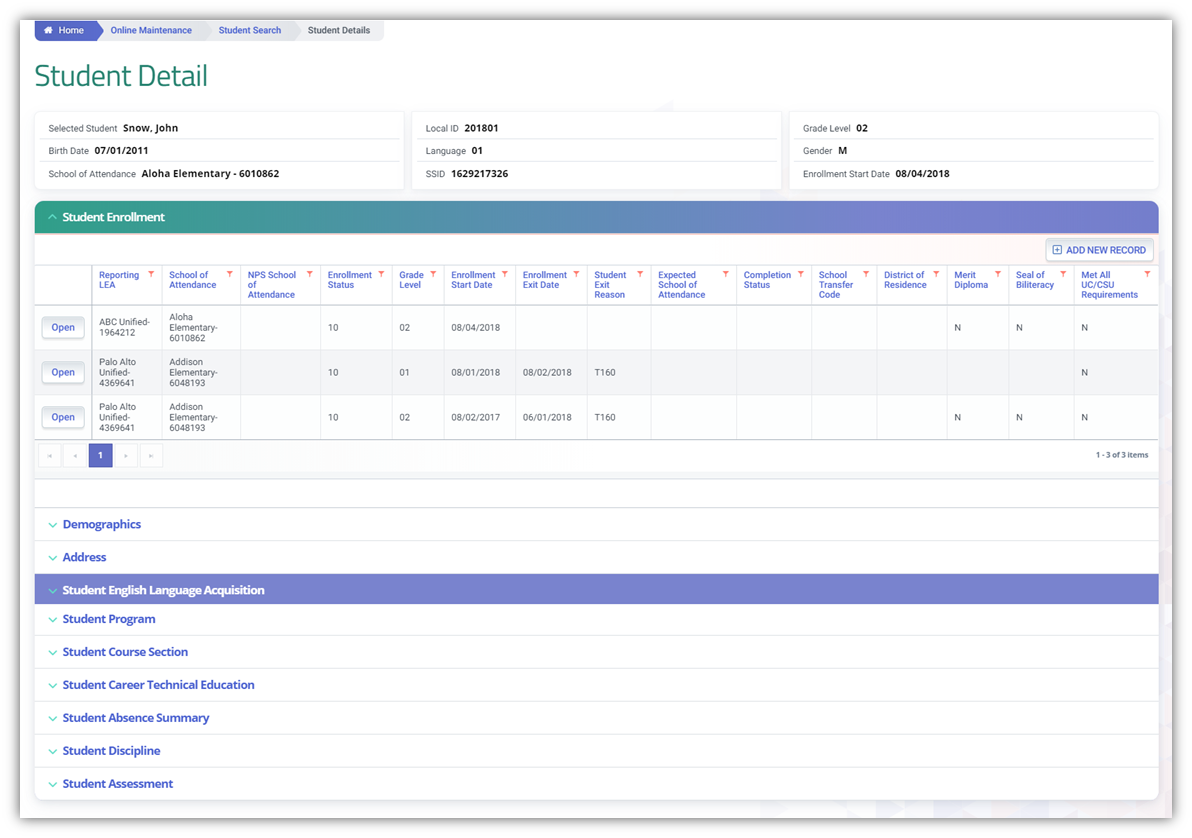
Clicking on the LEA Program header expands the container and reveals existing records.
Container column headers enable users to sort or filter existing incident records based on parameters set. Open button enable users to view details of the LEA Program record. Record can only be modified if the record is owned by the LEA the user is associated to and the user has LEA-level security. Since the container only shows limited records at a time, the page buttons allow users to move to the next set of records. If a user is authorized to add and edit records, the user will be able to click on Add a New Record button and add a record.SELA Details Modal
The Student English Language Acquisition details modal is depicted below followed by a screen elements table. If the Add New Record button is clicked, all fields on the page will be populated with Null values when the page opens. If the Edit is clicked, the system will display the “Student English Language Acquisition” page. If user does not own the student record, the Edit will be disabled.
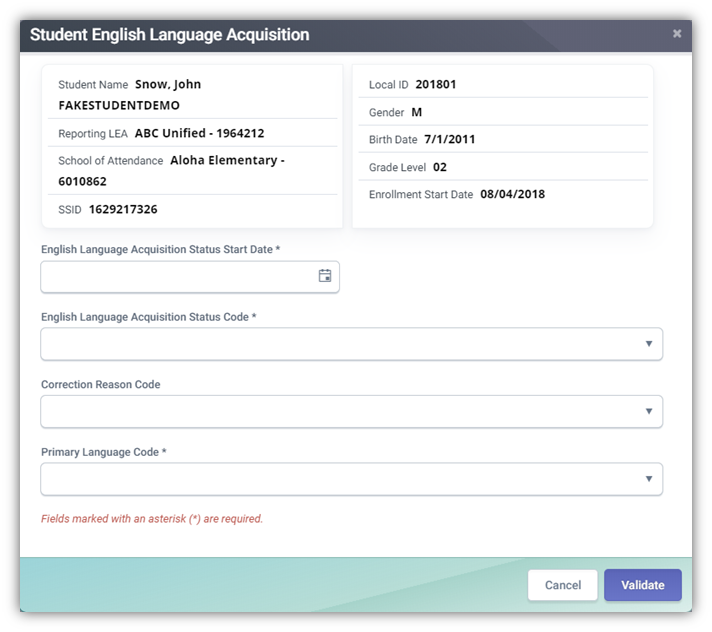
| # | Field Names | Required | Validation/Business Rule |
|---|---|---|---|
| 1 | English Language Acquisition Status Code | Y | Default to user’s current Org; only present values related to user’s Org |
| 2 | Correction Reason Code | N | Only valid if the prior record being corrected has a status date of 7/1/2018 onwards. (See When to report a SELA Correction reason code when a correction code is required.) |
| 3 | English Language Acquisition Status Start Date | Y | The Start Date must be provided for EO, EL, IFEP, and RFEP students, and for students who are TBD in grades TK–12. |
| 4 | Primary Language Code | Y | To be an English learner, the Primary Language Code must be a language other than English or American Sign Language. • This element is required for students in grades kindergarten through 12. It is NOT required and should not be submitted for pre-kindergarten students. |
| This element is required for students in grades kindergarten through 12. It is NOT required and should not be submitted for pre-kindergarten students. | |||
| Action Buttons | |||
| A | Delete Record | N/A | If clicked, the system will delete the student’s program record from the ODS when the user confirms the deletion. “Are you sure you want to delete this record? Yes/No” |
| B | Cancel | N/A | If clicked, the modal will close and the system will display the Program Container page. |
| C | Post | N/A | If the user clicks the button, system will post records. If not successful, “Post failed” with accompanying error message will appear. |
SELA Data Reporting Essentials
A SELA record is expected for ALL students, in ALL enrollment Types (10,30), and in grades TK - 12 that are enrolled in a school that is expected to report SELA records.
Private School enrollments do not require a SELA based on the School of Attendance = 0000002.
When to submit a SELA record
Update student English Language Acquisition Status (ELAS) data only:
- Upon enrollment of a NEW student (brand new SSID).
- When a student has a valid change in their ELAS.
- When any TK–12 student with an ELAS of “TBD” has that status for more than 90 days from the ELAS Start Date.
ELAS Codes
Below are the possible English Language Acquisition Status Codes available. ELAS status EL and IFEP are expected to come from the daily TOMS update. Submission of EL and IFEP through Online Maintenance is accepted with valid Correction Codes. However, it is best practice to rely on TOMS to push the status to CALPADS.
| Coded Value | Name | Definition | Submission Method | Start Date |
|---|---|---|---|---|
| EL | English Learner | A student enrolled in grades KN through 12 for whom there is a report of a language other than English on the Home Language Survey and who, upon initial assessment in California using an appropriate state assessment (currently the California English Language Development Test (ELPAC)) and from additional information when appropriate, is determined to lack the clearly defined English language skills of listening, speaking, reading, and/or writing necessary to succeed in the school's regular instructional programs. | TOMS Update | 7/1/1990 |
| ADEL | Adult English Learner | A student aged 22 years or older enrolled in grades KN through 12 who has been identified by a local educational agency as an English learner through a local process (e.g., Home Language Survey, or other local assessment) because the student is not eligible to take the Initial English Language Proficiency Assessment for California (ELPAC). Adult English learners are not considered English Learners for purposes of federal Title III funding or state-level accountability. | Batch File Online Maintenance |
7/1/2020 |
| EO | English or American Sign Language Only | A student enrolled in grades TK through 12 for whom the only language reported on the Home Language Survey (HLS) is English or American Sign Language. | Batch File Online Maintenance |
7/1/1990 |
| IFEP | Initial Fluent English Proficient | A student enrolled in grades KN through 12 for whom a language other than English is reported on the Home Language Survey and who, upon initial assessment in California using an appropriate state assessment (currently the English Language Proficiency Assessments for California (ELPAC)) and from additional information when appropriate, is determined to be proficient in English. | TOMS Update | 7/1/1990 |
| RFEP | Reclassified Fluent English Proficient | A student enrolled in grades KN through 12 who, upon entering public school in California, is identified as an English learner (EL) and subsequently reclassified/redesignated in California, per Education Code 313, as proficient in English. Education Code 313 criteria include, but are not limited to, an assessment of English proficiency in listening, speaking, reading, and writing as currently measured by the English Language Proficiency Assessments for California (ELPAC), teacher evaluation of curriculum mastery, parental opinion/consultation, and student's performance of basic skills, as measured by the California Standards Test English Language Arts, that demonstrates sufficient proficiency in English to participate effectively in a curriculum designed for students of the same age whose native language is English. | Batch File Online Maintenance |
7/1/1990 |
| TBD | To Be Determined | A student enrolled in grades TK through 12 for whom there is a report of a primary language other than English on the Home Language Survey and for whom the district has not completed the assessment process. The assessment process must be completed within 30 days of initial enrollment. | Batch File Online Maintenance |
7/1/1990 |
Normal SELA Status Progression
Below is the diagram of acceptable student ELAs status progression. A SELA record will not require an ELAS status correction code when SELA reporting follows this progression.
flowchart LR

    HLS[Home Language Survey]

    TBD[TBD]
    IFEP[IFEP]
    EL[EL]
    RFEP[RFEP]
    EO[EO]
    ADEL[ADEL]

    %% Main flows
    HLS --> TBD
    HLS --> EO
    HLS -.-> ADEL

    TBD --> IFEP
    TBD --> EL

    EL --> RFEP

    %% Reclassification / alternate paths
    EL -.-> ADEL

    %% Styling
    classDef teal fill:#4DB6AC,color:#000,stroke:#4DB6AC;
    classDef yellow fill:#F4B400,color:#000,stroke:#F4B400;
    classDef coral fill:#F76C5E,color:#000,stroke:#F76C5E;
    classDef blue fill:#5C6BC0,color:#fff,stroke:#5C6BC0;
    classDef gray fill:#BDBDBD,color:#000,stroke:#BDBDBD;

    class HLS teal;
    class TBD,EO yellow;
    class IFEP,EL coral;
    class RFEP blue;
class ADEL gray;Status determined based on filled out Home Language Survey form
Status determined based on Initial ELPAC test results.
Proficiency status after passing Summative ELPAC. Status must be preceded by EL Record
ELAS Status for students KN-12 who are 22 yrs old and above whose HLS show to be foreign language speaking but are ineligible for ELPAC testing due to age.
Note
- Solid arrows (
-->) represent primary pathways Unlike EL and IFEP statuses where TOMS sends the information directly to CALPADS, RFEP records are recorded by LEAs in their SIS and extracted and reported to CALPAD S using the SELA file. - Dashed arrows (
-.->) represent pathway for Adult ELs age 22 and above who cannot take the ELPAC due to age limitations
When to report a SELA Correction Reason Code
The SELA Correction reason codes are only applicable when the prior SELA record being corrected has a date on or after 7/1 of the current academic year. And the new SELA record being reported does not follow the normal ELAS status progression. A correction can only be done once and prior to summative testing.
SELA Correction Code Matrix
| Most Recent English Language Acquisition Status Code (ODS) | Subsequent English Language Acquisition Status Code | Correction Reason Code on Subsequent ELA record | Correction Reason Code Name on Subsequent ELA record |
|---|---|---|---|
| EO | TBD | 1 | Evidence of Non-English Primary Language |
| EL | EO | 4 | Ineligible Student Tested |
| EL | IFEP | 5 | Evidence for EL or IFEP |
| IFEP | EO | 4 | Ineligible Student Tested |
| IFEP | EL | 5 | Evidence for EL or IFEP |
ELAS Data Flow
Here is a diagram detailing a non-english speaking student's elas status determination from home language survey to initial ELPAC testing and final ELAS status.
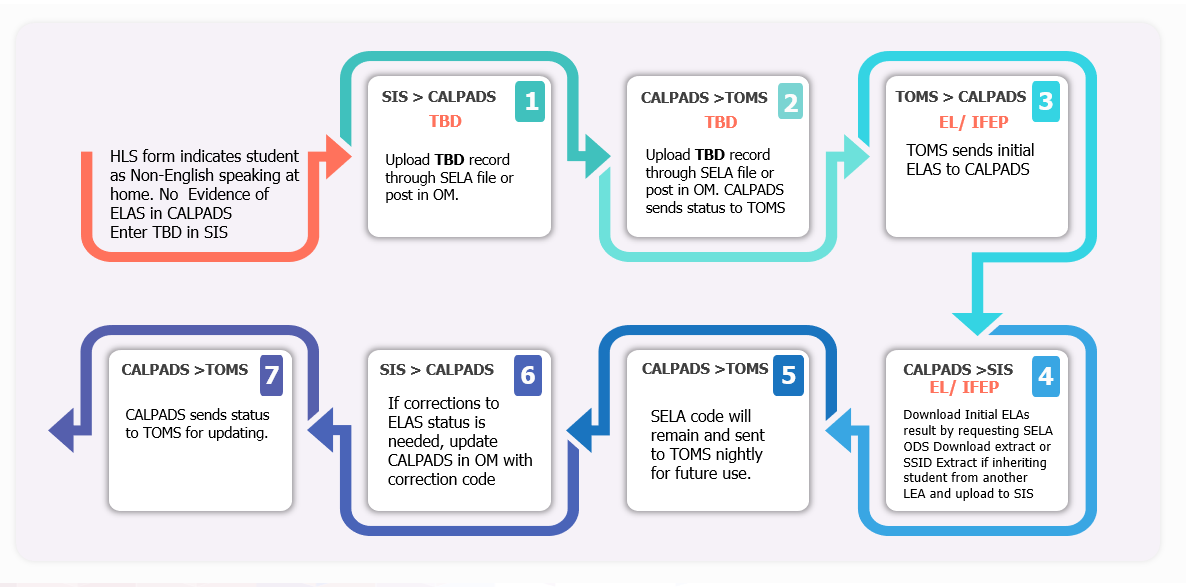
Initial ELPAC Testing Guidance
In order to ensure a student is eligible to test with Initial ELPAC in TOMS the following data are necessary in CALPADS.
- Primary (10) or Short-term (30) Enrollment
- Grade level K-12
- Student English Language Acquisition Status (SELA) of “TBD” with a non-English primary language
- Student Information (SINF) record with start date on or before enrollment start date
Once posted in CALPADS, data take a minimum of 48 hours to appear in TOMS
Once testing is completed (all 4 domains) and all scores are entered into the data entry interface in TOMS, initial ELAS of EL or IFEP is sent to CALPADS overnight with a start date = test completion date
Initial ELPAC Testing Common Issues
Student tested, but result is not reflected in CALPADS. This happens for one of the following reasons:
- LEA deleted the TBD record in CALPADS
- LEA changed the start date of the TBD record to a date AFTER testing was completed
- LEA changed the primary language to a English or Sign Language
- LEA changed the student’s grade level
Student was tested with multiple SSIDs and now has two ELAS records after the MID merge. Avoid this by:
- Ensuring a student doesn’t already have an SSID in CALPADS before assigning a new one
- Checking student’s existing ELAS in CALPADS
Student tested but was ineligible to test, or the LEA has evidence that the student’s test result may be incorrect.
- LEA should always allow initial ELAS to populate in CALPADS
- ELAS can then be corrected through online maintenance using a Correction Reason Code
- The following Correction Reason Codes have been retired:
- 2 Rotating Score Validation Process Error (use 5 – Evidence for EL or IFEP)
- 3 Home Language Survey Error (use 4 – Ineligible Student Tested)
Summative Testing and RFEP Reporting
The Summative English Language Proficiency Assessments for California (ELPAC) is an annual assessment to measure an English learner's progress toward English language proficiency (ELP). The Summative ELPAC must be given annually to students identified as EL students until they are RFEP.
Testing Window: The Summative ELPAC is administered in the spring, from February 1 to May 31.
Purposes
The purposes of the Summative ELPAC are to determine the level of ELP of EL students and to assess the progress of EL students in acquiring the skills of listening, speaking, reading, and writing in English. The following are the English proficiency statuses for students associated with taking the Summative ELPAC
- EL—English learners
- RFEP—reclassified fluent English proficient
All EL students must be administered the ELPAC until they are reclassified. There is no parent opt out or medical exemption for this assessment.
Note
Unlike EL and IFEP statuses where TOMS sends the information directly to CALPADS, RFEP records are recorded by LEAs in their SIS and extracted and reported to CALPAD S using the SELA file.
Guidance for Submitting RFEP Records to CALPADS
Lifted from CALPADS Flash #300
| Scenario | For students who are reclassified… | Submit an ELAS of RFEP with a start date… | This student will count as reclassified in … |
|---|---|---|---|
| 1 | before the end of the school year while the student is still enrolled in the school and in CALPADS… | equal to that of the last dated signature on the reclassification form. | 2024−25 in the school where the student was last enrolled if the LEA certifies this RFEP count in report 2.16 in 2024−25 EOY 3/. |
| 2 | after the end of the school year (and before EOY 3 closes) and the student has been exited and has no enrollment in CALPADS, and will not be re-enrolling in the same school in the next school year (e.g., graduating or students matriculating to another school)… | equal to the last day the student was enrolled in the prior school year where the student was enrolled. | 2024−25 in the school where the student was last enrolled if the LEAs certifies this RFEP count in report 2.16 in 2024−25 EOY 3/. |
| 3 | after July 1 but before school starts for the next school year, (and before EOY 3 closes), and the student has been exited and has no enrollment in CALPADS, and is expected to re-enroll in the same school… | equal to the last day the student was enrolled in the prior school year where the student was enrolled. | 2024−25 in the school where the student was last enrolled if the LEA certifies this RFEP count in report 2.16 in 2024−25 EOY 3/. |
| 4 | after July 1 and the student is now enrolled in the next school year in the same school as in the prior school year… | equal to that of the last dated signature on the reclassification form where the student is now enrolled. | 2025−26 in the school where the student is now enrolled, which is the same school where the student was enrolled in the prior school year, if the LEA certifies this RFEP count in report 2.16 in 2025−26 EOY 3/. |
| 5 | after July 1 and the student is now enrolled in the next school year in a school that is different from the school where the student was enrolled in the prior school year. |
Correcting SELA Status through STAIRS Process
LEAs requesting to delete an EL or IFEP record generated by ELPAC computer-based assessments will need to go through the Security and Test Administration Incident Reporting System (STAIRS) and Appeals process.
Vignettes: STAIRS Reporting Process Videos
- STAIRS and Appeals Process
- Small District – (Video)
- Small District – (Video)
- Medium District – (Video)
- Medium District – (Video)
- Large District – (Video)
- Large District – (Video)
- Large District – (Video)
- Charter – (Video)
- Charter – (Video)
- COE – (Video)
Changing the Primary Language of Existing Students
Resource: CALPADS Flash 256
LEAs with high counts of existing students with language codes of 99 or UU, may want to decide whether to change the primary language for those students to an individual language code, if allowed by CALPADS. In making this determination, LEAs should consider the need to review their Home Language Surveys and/or re-survey those students for their primary language. It should be noted, however, based on current CALPADS validations, that LEAs will only be able to update the primary language codes of students who:
- were enrolled at the same LEA when the ELAS was submitted to CALPADS; and
- have ELAS start dates prior to July 1, 2020.
Generally, students’ primary language should never change. In particular, LEAs are specifically prohibited from changing students’ primary language to 00 – English or 37 – American Sign Language, unless their ELAS has been changed to EO – English Only in conjunction with a valid Language Correction Code. The new, more expansive CALPADS Language Code Set, however, does offer LEAs an opportunity to identify new languages spoken by or in the homes, not only of their new students but, of their existing students. Generally, the primary languages of these students have previously been identified using the language code 99 – Other non-English languages - 99, or UU – Unknown.
In order to enable LEAs to change the primary language codes of existing students, the new three-character codes will have effective dates of 7/1/1990 (the same as the existing two-character codes), which will enable LEAs to change the primary languages for existing students. There are, however, existing validations that limit LEAs’ ability to change primary language codes for all existing students.
Specifically, LEAs will be able to:
- Update the primary language code for any students with an ELAS of English Learner (EL) or Initial Fluent English Proficient (IFEP), with a start date prior to July 1, 2020, and who were enrolled at the same LEA when the ELAS status was submitted to CALPADS.
- Update the primary language code for any existing students that the LEA redesignated as Reclassified Fluent English Proficient (RFEP) and who were enrolled at the same LEA when the RFEP ELAS status was submitted to CALPADS.
- Update the primary language code of an existing student when updating the ELAS with a new status of RFEP.
LEAs will NOT be able to:
- Update the primary language code for any students with an ELAS of EL or IFEP with a start date after July 1, 2020. (This is due to the ELAS determination of EL or IFEP being sent directly to CALPADS upon students’ completion of the Initial ELPAC).
- Update the primary language code for any students with an ELAS of EL or IFEP that was submitted by another LEA with a ELAS Start Date prior to July 1, 2020; the prior LEA would have to make the change to the primary language. Submitting a record to change the primary language for a student whose most recent ELAS was submitted by another LEA will trigger GERR0005 – SELA: LEA does not have ownership of student enrollment to make the update.
SELA Additional References
| Resource | Description |
|---|---|
| CDE Home Language Survey Webinar Slides | Explain purpose and use of the Home Language Survey (HLS); describe process for the initial identification of English learner (EL) students; present HLS implementation best practices by local educational agencies (LEAs); provide information on where to access the California Department of Education (CDE) sample HLS and other resources. |
| CALPADS Assessments Webinar Padlet | Repository of Q&A during the CALPADS and Assessments Webinar held on 11/22/2024. |
| ELPAC Resources | Provides helpful resources for local educational agency personnel who administer the ELPAC. |
| ELPAC Archived Webcasts | Provides archived webcasts for the English Language Proficiency Assessments for California (ELPAC) for local educational agencies (LEAs). |
| CALPADS Error List | Look for SELA Errors. |
| CALPADS File Specifications | Look for Student English Language Acquisition Tab. |
| CALPADS Data Guide | Provides guidance on CALPADS data reporting and use. |