Postsecondary Status (PSTS)
(Updated 5/5/2026)
Postsecondary Status Essentials
PSTS
- Student Search
- PSTS View
- PSTS Edit
- PSTS for SPED Students Edit
- PSTS for SPED Students View
Replacement Type
- Reporting LEA
- Reporting SELPA (Only for EOY 1)
- SSID
- Education Program Participation Type Code
- Postsecondary Status Code
- Academic Year ID
- Reporting LEA
- Education Program Participation Type
- SSID
- Postsecondary Status Code
Legend
Table Value Legend
Y = Required: Schools are expected to submit data and will receive validation errors if data are not submitted.
N = No: Schools should NOT submit data.
P = Permitted: Schools are permitted, but not expected to submit data, but if SSIDs are obtained for students enrolled within those schools, then the data required to maintain those SSIDs must be submitted, and will receive validation errors if data are not submitted. Additionally, for “P” schools, certification validations will only be processed if data is submitted.
Table Footnote Legend
(1) Students completing courses in grades 7-12 only.
(2) Records for students enrolled at Nonpublic Nonsectarian Certified Schools (NPS) or Private School Group should be submitted using school code 0000001 for NPS or school code 0000002 for Private School Group in the School of Attendance field (1.05) and NOT the individual NPS or Private School Group school codes. NOTE: For NPS only, the actual NPS school code is submitted in the School of Attendance NPS field (1.06).
(3) Open and recently closed schools are included.
(4) ROC/Ps will not submit data directly to CALPADS. CALPADS will collect data on student ROC/P course enrollment and completion through the student's primary school course enrollment and completion submission.
(5) Home and Hospital schools are assigned a distinct county-district-school code and are not the same as a district-level operated Home and Hospital Program.
(6) Updated SINF data for Infant (includes Toddlers) and Prekindergarten in EOY 1 are only required for purposes of certifying report 5.4 -Homeless Students Enrolled - Unduplicated Count by School.
(7) Grade Level Codes Ungraded Secondary (US) and Ungraded Elementary (UE) will be retired as of 6/30/18, but available for transactional purposes prior to AY 2018-2019.
| School Type | Fall 1 |
|---|---|
| Traditional (non-educational options schools) | Y |
| District Level Programs (Independent Study and Home Hospital Programs) | P |
| County Community | Y |
| District Community Day | Y |
| Youth Authority Schools (Division of Juvenile Justice) | Y |
| Juvenile Court Schools | Y |
| Continuation High Schools | Y |
| Opportunity | Y |
| Alternative Schools of Choice | Y |
| State Special Schools | Y |
| Home and Hospital Schools (5) | Y |
| Department of Development Services | N |
| Department of State Hospitals | N |
| Special Education Consortium | Y |
| Special Education | Y |
| Non-Public School Group (0000001) (2) | N |
| Private School Group (0000002) (2) | N |
| ROP/ROC (4) | N |
Legend
Table Value Legend
Y = Required: Schools are expected to submit data and will receive validation errors if data are not submitted.
N = No: Schools should NOT submit data.
P = Permitted: Schools are permitted, but not expected to submit data, but if SSIDs are obtained for students enrolled within those schools, then the data required to maintain those SSIDs must be submitted, and will receive validation errors if data are not submitted. Additionally, for “P” schools, certification validations will only be processed if data is submitted.
Table Footnote Legend
(1) Students completing courses in grades 7-12 only.
(2) Records for students enrolled at Nonpublic Nonsectarian Certified Schools (NPS) or Private School Group should be submitted using school code 0000001 for NPS or school code 0000002 for Private School Group in the School of Attendance field (1.05) and NOT the individual NPS or Private School Group school codes. NOTE: For NPS only, the actual NPS school code is submitted in the School of Attendance NPS field (1.06).
(3) Open and recently closed schools are included.
(4) ROC/Ps will not submit data directly to CALPADS. CALPADS will collect data on student ROC/P course enrollment and completion through the student's primary school course enrollment and completion submission.
(5) Home and Hospital schools are assigned a distinct county-district-school code and are not the same as a district-level operated Home and Hospital Program.
(6) Updated SINF data for Infant (includes Toddlers) and Prekindergarten in EOY 1 are only required for purposes of certifying report 5.4 -Homeless Students Enrolled - Unduplicated Count by School.
(7) Grade Level Codes Ungraded Secondary (US) and Ungraded Elementary (UE) will be retired as of 6/30/18, but available for transactional purposes prior to AY 2018-2019.
| Grade Level | EOY 1 |
|---|---|
| Infants – IN (Includes Toddlers) | N |
| Prekindergarten - PS | N |
| Transitional Kindergarten - TK | N |
| Kindergarten - KN | N |
| First Grade - 01 | N |
| Second Grade – 02 | N |
| Third Grade – 03 | N |
| Fourth Grade – 04 | N |
| Fifth Grade – 05 | N |
| Sixth Grade – 06 | N |
| Seventh Grade – 07 | N |
| Eighth Grade – 08 | N |
| Ninth Grade – 09 | N |
| Tenth Grade – 10 | N |
| Eleventh Grade – 11 | N |
| Twelfth Grade – 12 | Y |
| Adult – AD | N |
Postsecondary Status (PSTS) Details
Users may have the ability to edit PSTS records that are owned by the LEA, if the authorized role is assigned by the LEA Administrator. An authorized user may perform the following functions through this interface:
- Add, Edit, Delete one or all of a a student's Postsecondary Status records belonging to the LEA
- View one or all of a student’s Postsecondary Status records belonging to the user or another LEA (depending on the user permissions)
Navigating to the PSTS User Interface
A user first searches the student either through the SSID or demographic search process to get to the Student Details page. By default, the LEA Program container will be in the collapsed position. Clicking the container header displays the individual program records for the selected student.
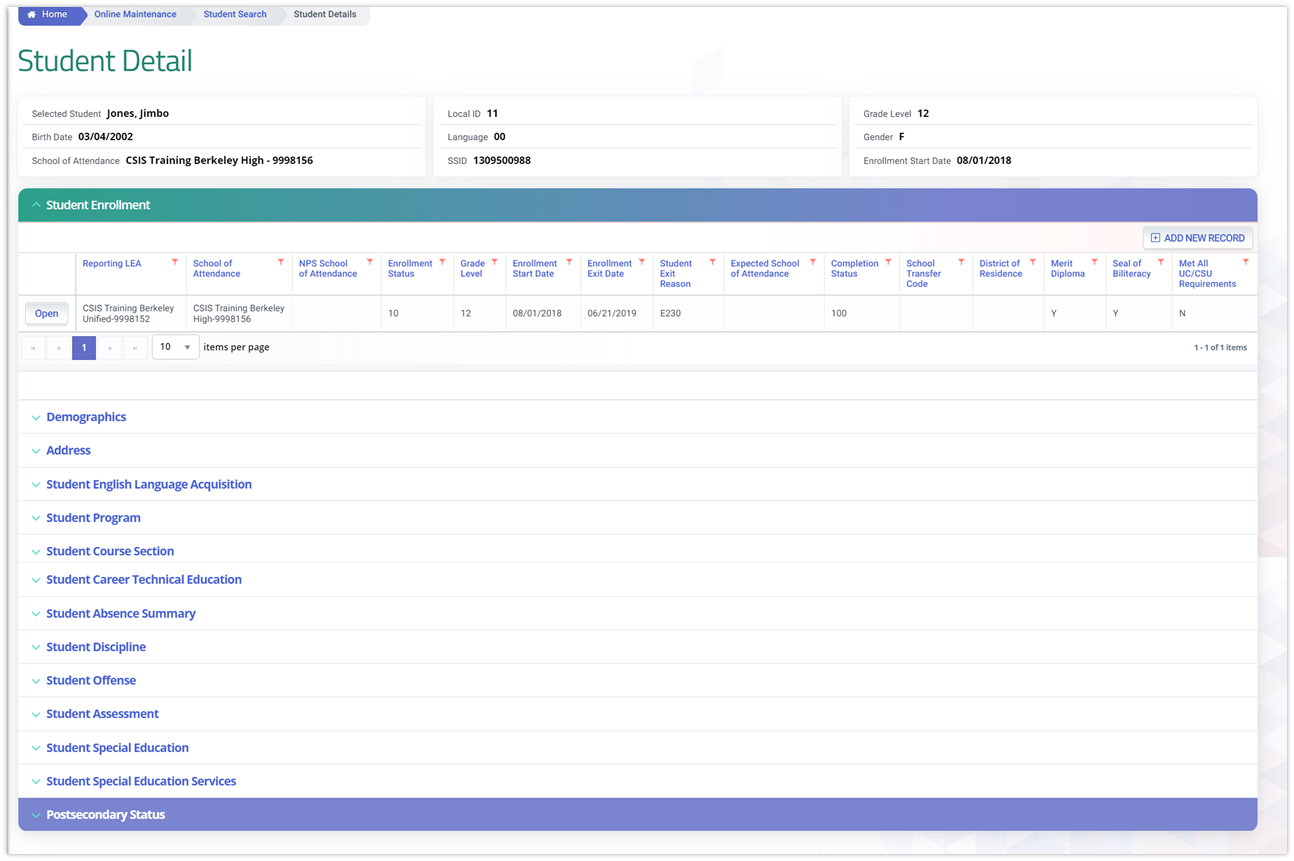
Postsecondary Status (PSTS) Container
The Postsecondary Status (PSTS) page displays when the user clicks the container header. The system will display a button next to each record to open the record in read-only. The UI is depicted below followed by its screen elements table. This is followed by user interaction section and the system operations section with the additional expected system functions, requirements and possible processes. The system will display all Postsecondary Status records by default in reverse chronological order.

Clicking on the Postsecondary Status header expands the container and reveals existing records.
Container column headers enable users to sort or filter existing incident records based on parameters set. Open button enable users to view details of the Postsecondary Status record. Record can only be modified if the record is owned by the LEA the user is associated to and the user has LEA-level security. Since the container only shows limited records at a time, the page buttons allow users to move to the next set of records. If a user is authorized to add and edit records, the user will be able to click on Add a New Record button and add a record.Postsecondary Status (PSTS) Modal
The Postsecondary Status details modal is depicted below followed by a screen elements table. If the user clicks to open an existing record, the modal page appears with the values from the student’s selected record.
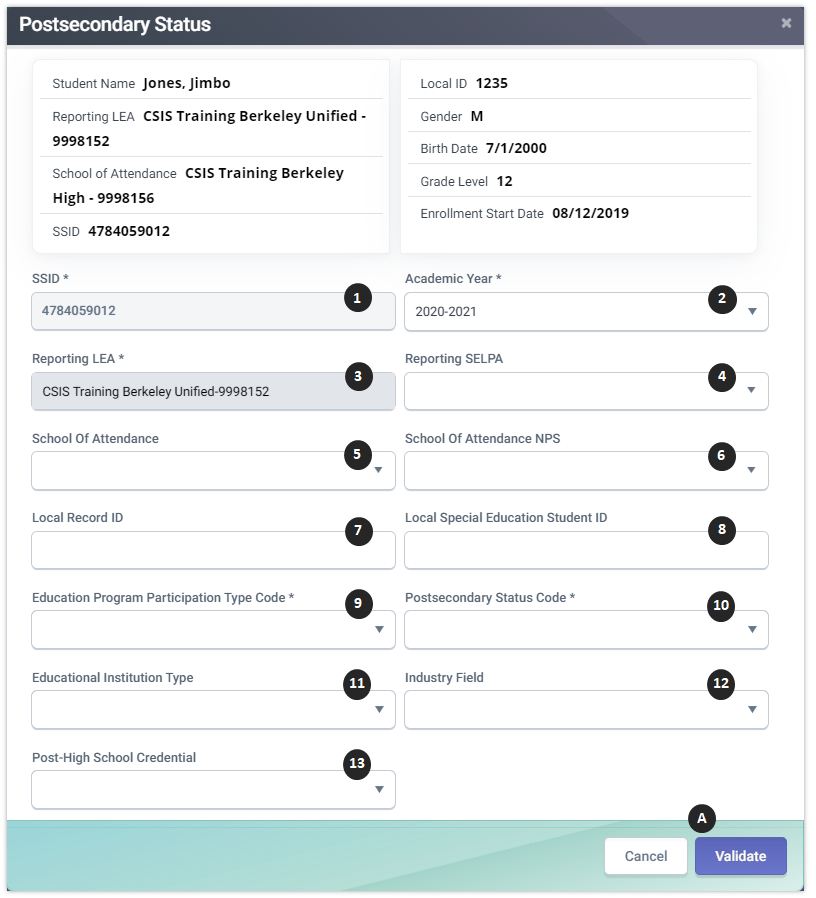
PSTS Details Table
| Field | Field Names | Required | Validation/Business Rule |
|---|---|---|---|
| 1 | SSID | Y | 1) If Education Program Participation Type Code = 10 (California Partnership Academy) or 20 (Career Technical Education) Then the Reporting LEA must match the equivalent field in the most recent SSID Enrollment record in the prior year associated with the LEA. 2) If Education Program Participation Type Code = 30 (Special Education) Then the Reporting LEA and SSID must match the equivalent field in a SPED record in the prior year where Education Plan Type = 100. |
| 2 | Academic Year ID | Y | 1) Must be a valid academic school year combination and no more than one year in the future 2) Indicates the school year associated with the year in which the data are being reported. For example, the Academic Year ID would be 2023-2024 even though you are reporting postsecondary information for students who exited secondary education in the 2022-2023 school year. |
| 3 | Reporting LEA | Y | The 7-digit County District (CD) code must be submitted if the entity is a district or county office. 1) If Education Program Participation Type Code = 10 (California Partnership Academy) or 20 (Career Technical Education) Then the Reporting LEA must match the equivalent field in the most recent SSID Enrollment record in the prior year associated with the LEA. 2) If Education Program Participation Type Code = 30 (Special Education) Then the Reporting LEA and SSID must match the equivalent fields in a SPED record in the prior year where Education Plan Type = 100. |
| 4 | Reporting SELPA | Required If Education Program Participation Type Code = 30 (SPED) | If Education Program Participation Type Code = 10 or 20, then the value must be blank. |
| 5 | School of Attendance | Y | A unique identifier for the school that delivers a majority of educational instruction and services and is where the student attends If School of Attendance NPS is populated, then School of Attendance must equal 0000001 |
| 6 | School of Attendance NPS | Required If School of Attendance = 0000001 | The 7-digit School (S) code must be submitted. If a special education student is enrolled at a non-public non-sectarian school that is not certified by the California Department of Education, use "9999999" in this field. This code is generic for "non-certified, non-sectarian non-public school." |
| 7 | Local Record ID | N | A local use field to provide the system record identifier for a submitted record in any California Longitudinal Pupil Achievement Data System (CALPADS) file format |
| 8 | Local Special Education Student ID | Required If Education Program Participation Type Code = 30 | If Education Program Participation Type Code = 10 or 20, then the field must be blank. |
| 9 | Education Program Participation Type | Y | 1) If Education Program Participation Type Code = 10 (California Partnership Academy), then Student School Completion Status and Education Program Membership End Date in ODS must not be null. 2) If Education Program Participation Type Code = 20 (Career Technical Education), then Student School Completion Status in ODS must = 100 (HSDiploma) and CTE Pathway Completion Year must be the same academic year as the Enrollment Exit Date. 3) If Education Program Participation Type Code = 30 (Special Education),then Student School Completion Status must not be null and must not = 480 (Matriculation). |
| 10 | Postsecondary Status Code | Y | If Postsecondary Status Code is not equal to 950 or 960, then another Postsecondary Status record for the same SSID and Education Program Participation Code cannot equal 950 or 960. |
| 11 | Educational Institution Type | Required If Postsecondary Status Code is 200, 210, 220, 300, 310, 320, 330, 340, 350, 360, or 370 | The type of educational or training institution based on the institution’s tax status: Public, Private Nonprofit, For Profit. Originally taken from the SNAP survey. (Exclusive to Fall 2 |
| 12 | Industry Field | Required If Postsecondary Status Code is 200, 210, 220, 300, 310, 320, 330, 340, 350, 360, 370, 910, 920, or 930 | The industry sector that best represents the field in which the respondent is employed, or the field in which the respondent will potentially be employed upon completion of the educational or training program where they are currently enrolled. Originally taken from the SNAP survey (Exclusive to Fall 2 |
| 13 | Post-High School Credential | N | A post-high school credential includes, an industry-recognized certification provided by a third-party entity, a degree or certificate issued by a postsecondary institution, a license issued by the State of California, or other measure of technical skill attainment that the respondent has received. Originally taken from the SNAP survey (Exclusive to Fall 2 |
| Action Buttons | |||
| A | Delete Record | N/A | If clicked, the system will delete the student’s program record from the ODS when the user confirms the deletion. “Are you sure you want to delete this record? Yes/No” |
| B | Cancel | N/A | If clicked, the modal will close and the system will display the Program Container page. |
| C | Post | N/A | If the user clicks the button, system will post records. If not successful, “Post failed” with accompanying error message will appear. |
Submission Details
The PSTS file format is used to submit employment and educational status after completing secondary education in the prior academic year. This information will be collected for students who are:
- Career technical education (CTE) completers and students participating in the California Partnership Academy Program six months after exiting secondary education; and
- Students with disabilities 12 months after exiting secondary education.
Because the postsecondary statuses of the student groups are required to be collected at different times, only specific student groups will be reported in specific CALPADS submissions.
The Postsecondary (PSTS) file contains the following information:
- Education Program Participation Type
- This identifies which type of education program the postsecondary information is submitted for (e.g., special education or CTE)
- If a student is both a student with disabilities and a CTE completer, the information must be solicited from this student six months after exiting for the CTE program, and 12 months after exiting for the special education program. Additionally, these two records would be submitted in different submission windows.
- Postsecondary Status
- CTE Related Program or Employment related information (only required for CTE and CPA students)
- One record for each postsecondary status provided. The postsecondary statuses for each student (SSID) are grouped by:
- Reporting LEA (District of Service)
- School of Attendance
A student can be reported with multiple PSTS records that reflect the status based on the survey.
PSTS Submission Period
This record type is required to be submitted and certified during the following submission windows:
- Fall 2 - For CTE Pathway completers
- End of Year 4 – For SPED Postsecondary completers
Who should LEAs survey for PSTS for Fall 2?
LEAs should survey CTE pathway completers, as currently defined, who exited secondary education in the prior academic year (regardless of cohort) and were not expected to return
This should include any student who was a CTE pathway completer at any time during high school in grades 9-12
Identifying PSTS students to survey for Fall 2
OPTION 1: Student Information Systems (SIS) may have functionality to identify these students, OR
OPTION 2: LEAs can use CALPADS to assist in identifying these students:
-
Step 1: Find students who exited secondary education in the prior academic year.
- Use ODS report 8.1a Student Profile – Exits
-
Apply the following filters:
- Enrollment Status: 10, 30
- Grade: 11, 12
- From Date: 8/16/Prior year
- Through Date: 8/15/Current Year
- School Exit = E230
- School Completion Status = 100, 120, 250, 320, 330, or 360
-
Make sure to run the Completion Status and Exit Reason filters in two different steps to make sure all students are identified
-
Step 2: Find students who were identified as CTE Completers in any grades 9-12.
-
Run Snapshot Report 3.20 - Career Technical Education Completers - Student List and filter as follows:
-
Academic Year: 2024-25, 2023-24, 2022-23,
- Grade: 12;11;10
-
Perkins/CTEIG Fundable: Y,N (all)
-
Make sure to run the report 3 times reflecting each prior the Academic Year
-
Students Reported for PSTS for Fall 2
Fall 2: Submit only Postsecondary Status (PSTS) records for students who exited secondary education in the prior academic year that were identified as:
- Career Technical Education pathway completers and any point during their 4 year stay; and
- Students who participated in the CA Partnership Academic Program, if available
PSTS Code Mapping to Perkins V
The CDE will map the existing CALPADS Postsecondary Status Codes into the federal reporting categories for Perkins V as follows:
| CALPADS Code | CALPADS Code Name | Federal Reporting Category for Perkins V |
|---|---|---|
| 200 | Enrolled in a Four-year college/university | Postsecondary – Baccalaureate Degree |
| 210 | Enrolled in a community college | Postsecondary – Associate Degree |
| 220 | Enrolled in a vocational or technical school (two year degree program) | Postsecondary – Associate Degree |
| 300 | Enrolled in a High School Equivalency Test Preparation Program | Not included in numerator |
| 310 | Enrolled in a vocational or technical school (certificate program) | Postsecondary – Certificate |
| 320 | Enrolled in a Regional Occupational Program (ROP) | TBD |
| 330 | Enrolled in a Work Force Innovation and Opportunity Act (WIOA) Supported Program | TBD |
| 340 | Enrolled in a Non-Workability Employment Program | Employment |
| 350 | Enrolled in an Adult Training Program | TBD |
| 400 | Military Enlistment | Military Service |
| 900 | Incarcerated | Not included in numerator |
| 910 | Competitively Employed | Employment |
| 920 | Not Competitively Employed | Employment |
| 930 | Other employment | Employment |
| 940 | Other | Not included in numerator |
| 950 | Not able to contact | Not included in numerator |
| 960 | Refused to answer | Not included in numerator |
PSTS Survey Template Guide for Fall 2
To alleviate the administrative burden of collecting CTE Completer data for three separate programs, the CDE has created the CTE Completer Postsecondary Status Survey template. This guide will aid in populating the survey results to the appropriate CALPADS field.
Download: PSTS Survey Template
| Question | CALPADS PSTS Field | Possible Code Choices |
|---|---|---|
| 1 Are you enrolled in one of the following educational or training programs? Select the one that best applies. If you are not enrolled in any educational or training program, do not check any. | Field 17.12–Postsecondary Status Code | Postsecondary Status Code Set Four-year - College/University (map to Code 200) Community college (210) Vocational or technical school (two-year degree program) (220) High School Equivalency Test Preparation Program (300) Vocational or technical school (certificate program) (310) Regional Occupational Program (ROP) (320) Work Force Innovation and Opportunity Act (WIOA) Supported Program (330) Non-Workability Employment Program (340) Adult Training Program (350) State Apprenticeship Program (360) Other Job Training Program (370) |
| 2 If you checked one of the above for question 1, was the program: | Field 17.13–Educational Institution Type | Educational Institution Type Code Set Public (10) Private Nonprofit (20) For Profit (30) |
| 3 Are you enlisted in the military? | Field 17.12–Postsecondary Status Code, if response is Yes | - Yes (Populated with Code 400–Military Enlistment) No |
| 4 Are you incarcerated? | Field 17.12–Postsecondary Status Code, if resnpose is Yes | - Yes (Populated with Code 900–Incarcerated) No |
| 5 Are you employed? | Field 17.12–Postsecondary Status Code, if response is Yes | - Yes, Full-time or part-time employment with compensation at or above minimum wage (910) Yes, Full-time or part-time employment with compensation less than minimum wage (920) No |
| 6 Are you enrolled in one of the following? (Only check if applicable) | Field 17.12–Postsecondary Status Code, if checked | Postsecondary Status Code Set Peace Corps (500) Ameri Corps (510) |
| 7 If none of the above options apply, check one of the following: | Field 17.12–Postsecondary Status Code | Postsecondary Status Code Set Other (940) Not able to contact (950) I decline to respond (960) |
| 8 If you are employed, what type of business or in what field are you employed? Check which industry best represents the type of employment) | Field 17.14–Industry Field | Career Technical Education Industry Field Code Agriculture and Natural Resources (Map to code AGR) Arts, Media, and Entertainment (ART) Building and Construction Trades (BLD) Business and Finance (FIN) Education, Child Development, and Family Services (EDU) Energy, Environment, and Utilities (NRG) Engineering and Architecture (ENG) Fashion and Interior Design (FSN) Information and Communication Technologies Health Science and Medical Technology Hospitality, Tourism, and Recreation (HOS) Manufacturing and Product Development (MAN) Marketing, Sales, and Service (MAR) Transportation (TRA) Public Services (PUB) Other (OTH) |
| 9 Have you received one of the following? | Field 17.15–Post-High School Credential | Post-High School Credential Type Code Set Industry-recognized credential (e.g. Serv-Safe, NIMS, AWS, etc.) (10) Certificate issued by a post-secondary institution (20) Degree awarded by a postsecondary institution (30) License issued by the State of California (e.g. Cosmetology, CNA, etc.) (40) Other measure of technical skill attainment (e.g. third-party certification, NOCTI, Certiport, etc.) (50) None of the above |
CTE Survey Reporting FAQs
The following are answers to the most common question pertaining to the CTE completer survey collection and reporting taken from the 2022 CTE Completer Data webinar.
| Question | Answer |
|---|---|
| What year students are we surveying and reporting during the 2025–2026 Career Technical Education (CTE) Completer Data reporting period? | You should survey CTE Completers from the previous academic year (AY). For the 2023–2024 reporting period, you will report completers who exited 12th grade in the 2021–22 AY. |
| Does the California Department of Education (CDE) have a Career Technical Education Course Code Definitions by Sector and Pathway User Guide? | Yes. The 2021–22 version is the most recent. To request a copy, email ctedata@cde.ca.gov. |
| If we already have data from sources like the National Student Clearinghouse or credential attainment, do we still need to survey students? | Yes. You may use existing data for items available, but you must survey students for any remaining required data elements using the CDE template. |
| Can a student be both enrolled in education/training and employed? | Yes. Collect and report both enrollment and employment information in CALPADS. |
| Are independent study charter schools and Dashboard Alternative School Status (DASS) schools required to complete surveys? | Yes. They must survey their previous academic year 12th grade students. |
| Should survey data be uploaded by individual districts or the consortium lead LEA? | Individual school districts upload their own data. A consortium lead LEA reports only its own students, not those of other members. |
| Which students should be surveyed for CTE Completer data? | Survey students who exited secondary education in the previous AY with a CALPADS designation, completed a CTE pathway sequence including a capstone course with a passing grade (C- or better), even if completed before senior year. |
| If ROP students are surveyed by their home schools, does the COE also need to submit the data? | No. Reporting is done by individual LEAs. COEs only report if students were directly enrolled with them. Home schools remain responsible for CALPADS reporting. |
| What if an LEA has no completers to report? | Report 17.1 in CALPADS will show zeros. LEAs can approve the report with zeros or submit records with code 950 or 960 to indicate no responses. |
| If an LEA did not receive CTEIG funding previously, do they still need to submit Postsecondary Status (PSTS) data? | Yes. All LEAs operating CTE programs must collect and submit data regardless of funding. |
| Who is responsible for entering CTE data into CALPADS? | The CALPADS Coordinator enters the data. CTE Coordinators should collaborate with them to ensure accurate reporting. |
| How are LEAs collecting this data? | Data is collected through methods such as mobile numbers, email, social media, Google surveys, SurveyMonkey, and phone banking. |
| Where do Adult Education Schools report CTE Completer Data? | Adult Education programs report through TOPSpro, not CALPADS. |
Identifying PSTS students to survey for EOY 1
LEAs are required to survey SWD with Education Plan Type = 100 (IEP), who exited secondary education in the prior academic year with one of the following exit or school completion status codes and who did not re-enroll in the current academic year:
-
School Completion Status Code
- Graduated, standard HS diploma (100)
- Students with Disabilities Certification of Completion (120)
- Adult Ed High School Diploma (250)
- Received a High School Equivalency Certificate (and no standard diploma) (320)
- Passed CHSPE (and no standard diploma) (330)
- Completed grade 12 without completing graduation requirements, not grad (360)
-
Or alternatively, if a student exits using one of the following exit reasons:
- No known Enrollment – Truant (E140)
- Prior completion of Special Education (E125)
- Expelled No known Enrollment (E300)
- Other or Unknown (E400)
- Medical Reasons (E410)
- Transferred to College (T280)
Is there a survey template LEAs can use to collect postsecondary status data from students with disabilities?
Yes. Attachment 1, “Special Education Postsecondary Status Survey Template and Mapping Guide to CALPADS Postsecondary Transition Status File” provides a survey template that LEAs can use to survey students with disabilities who exited secondary education in 2019−20. This template also maps the survey responses to the CALPADS postsecondary status codes.
EOY 1 PSTS Recor Submission
Yes. Special Education Data System (SEDS) vendors must update the PSTS file layout via the Application Programming Interface (API) to include the three new data elements 17.13, 17.14, and 17.15, even though these fields should not be populated for students with disabilities in the EOY 1 submission. SEDS vendors may create these as filler fields. LEAs are reminded that this is a full replacement file and that data that pass the input validation rules automatically posts.
EOY 1 PSTS data Uses
The data submitted to and certified in CALPADS on the PSTS file in EOY 1 for students with disabilities are used to calculate State Performance Plan Indicator (SPPI) 14 – Post School Outcomes. This indicator is one of the measures used to determine the compliance status of each LEA as required by the federal Individuals with Disabilities Education Act (IDEA), and to select LEAs for participation in the Focused Monitoring process.
How is the PSTS data used to calculate State Performance Plan Indicator 14 – Post School Outcomes?
State Performance Plan Indicator 14 – Post School Outcomes, includes the percent of youth exiting secondary education in the prior year who had Individualized Education Plans (IEPs) in effect at the time they left school, and were: (20 U.S.C. 1416(a)(3)(B))
A. Enrolled in higher education within one year of leaving high school.
B. Enrolled in higher education or competitively employed within one year of leaving high school.
C. Enrolled in higher education or in some other postsecondary education or training program; or competitively employed or in some other employment within one year of leaving high school.
In order to calculate this indicator, the postsecondary status codes submitted to CALPADS are first mapped to one of the following SSPI 14 outcomes (a, b, c, d, e):
| SSPI 14 Outcome | Description |
|---|---|
| a | Higher Education |
| b | Competitive Employment |
| c | Any other Education/Employment/Training |
| d | Other Employment |
| e | Not Education or Employment |
The postsecondary status codes are mapped to the SSPI 14 outcomes as follows:
| Postsecondary Status Code | Name | SPPI 14 Outcome |
|---|---|---|
| 200 | Enrolled in a 4-year college/university | a |
| 210 | Enrolled in a community college | a |
| 220 | Enrolled in a vocational or technical school (2-yr degree program) | a |
| 300 | Enrolled in a High School Equivalency Test Preparation Program | c |
| 310 | Enrolled in a vocational or technical school (certificate program) | c |
| 320 | Enrolled in a Regional Occupational Program (ROP) | c |
| 330 | Enrolled in a Work Force Innovation & Opportunity Act (WIOA) Supported Program | c |
| 340 | Enrolled in a Non-Workability Employment Program | c |
| 350 | Enrolled in an Adult Training Program | c |
| 360 | State Apprenticeship Program* | c |
| 370 | Other Job Training Program* | c |
| 400 | Military enlistment | c |
| 500 | Peace Corps* | c |
| 510 | Ameri Corps* | c |
| 900 | Incarcerated | e |
| 910 | Competitively employed | b |
| 920 | Not Competitively employed | d |
| 930 | Other employment | d |
| 940 | Other | e |
| 950 | Not able to contact | N/A (not included) |
| 960 | Refused to answer | N/A (not included) |
PSTS Survey Template Guide for EOY 1
To alleviate the administrative burden of collecting CTE Completer data for three separate programs, the CDE has created the CTE Completer Postsecondary Status Survey template. This guide will aid in populating the survey results to the appropriate CALPADS field.
Download: PSTS for SPED Survey Template
| Question | CALPADS PSTS Field | Possible Code Choices |
|---|---|---|
| 1 Are you enrolled in one of the following educational or training programs? Select the one that best applies. If you are not enrolled in any educational or training program, do not check any. | Field 17.12–Postsecondary Status Code | Four-year College/University (map to Code 200) Community college (210) Vocational or technical school (two-year degree program) (220) High School Equivalency Test Preparation Program (300) Vocational or technical school (certificate program) (310) Regional Occupational Program (ROP) (320) Work Force Innovation and Opportunity Act (WIOA) Supported Program (330) Non-Workability Employment Program (340) Adult Training Program (350) State Apprenticeship Program (360) Other Job Training Program (370) |
| 2 Are you enlisted in the military? | Field 17.12–Postsecondary Status Code, if response is Yes | - Yes (Populated with Code 400–Military Enlistment) No |
| 3 Are you incarcerated? | Field 17.12–Postsecondary Status Code, if respose is Yes | - Yes (Populated with Code 900–Incarcerated) No |
| 4 Are you employed? | Field 17.12–Postsecondary Status Code, if response is Yes | - Yes, Full-time or part-time employment with compensation at or above minimum wage (910) Yes, Full-time or part-time employment with compensation less than minimum wage (920) No |
| 5 Are you enrolled in one of the following? (Only check if applicable) | Field 17.12–Postsecondary Status Code, if checked | Postsecondary Status Code Set Peace Corps (500) Ameri Corps (510) |
| 6 If none of the above options apply, check one of the following: | Field 17.12–Postsecondary Status Code | Postsecondary Status Code Set Other (940) Not able to contact (950) I decline to respond (960) |
Additional PSTS Resources
| Resource | Description |
|---|---|
| CALPADS File Specifications | Provides detailed information about the input files used to batch load data into CALPADS. |
| CALPADS Update FLASH #203 | Includes guidance on reporting the Postsecondary Status File in End-of-Year 4 for Special Education (2020–21). |
| PSTS CTE Data Survey (Template) | Survey template for collecting postsecondary status data of CTE completers from the prior academic year, used for CALPADS Fall 2 submission and Perkins V federal reporting. |
| PSTS SPED Data Survey (Template) | Survey template for collecting postsecondary outcomes for students with disabilities, used in CALPADS EOY 1 reporting and for SPPI 14 compliance under IDEA. |